
Google Slides alternatives, tested on PPTX files
Google Slides comes with a Google account, and in our tests it kept more of a PowerPoint file than Canva or Gamma did. People who look for Google Slides alternatives usually have one specific reason: a PowerPoint file that has to go back intact, a chart whose numbers have to stay editable, a first draft written by AI, or a deck that is a design first.
This page picks Dock, Canva or Gamma for each of those reasons, from tests we ran in November 2026. We make Dock, which edits the PowerPoint file itself. Each result has its date.
The short answer
In our November 20, 2026 tests, Dock was the Google Slides alternative for PowerPoint files. It kept all nine harder PowerPoint features we tried: a chart with its data, a company template, SmartArt, a trimmed video, review comments, sections, a sensitivity label, a Morph transition and the macros in a .pptm. Google Slides kept part of one, the company template, and lost the other eight. Canva suits decks that are designs first, and Gamma a web deck with photos drafted from an outline. Stay with Google Slides if your team works in Google Workspace and the deck stays there.
Pick by the reason you are leaving
| Your reason | Pick | What our tests showed |
|---|---|---|
| Clients and colleagues send and expect PowerPoint files | Dock | It kept all nine features in the nine-file test. Google Slides renamed the template’s layouts and changed its fonts to Arial |
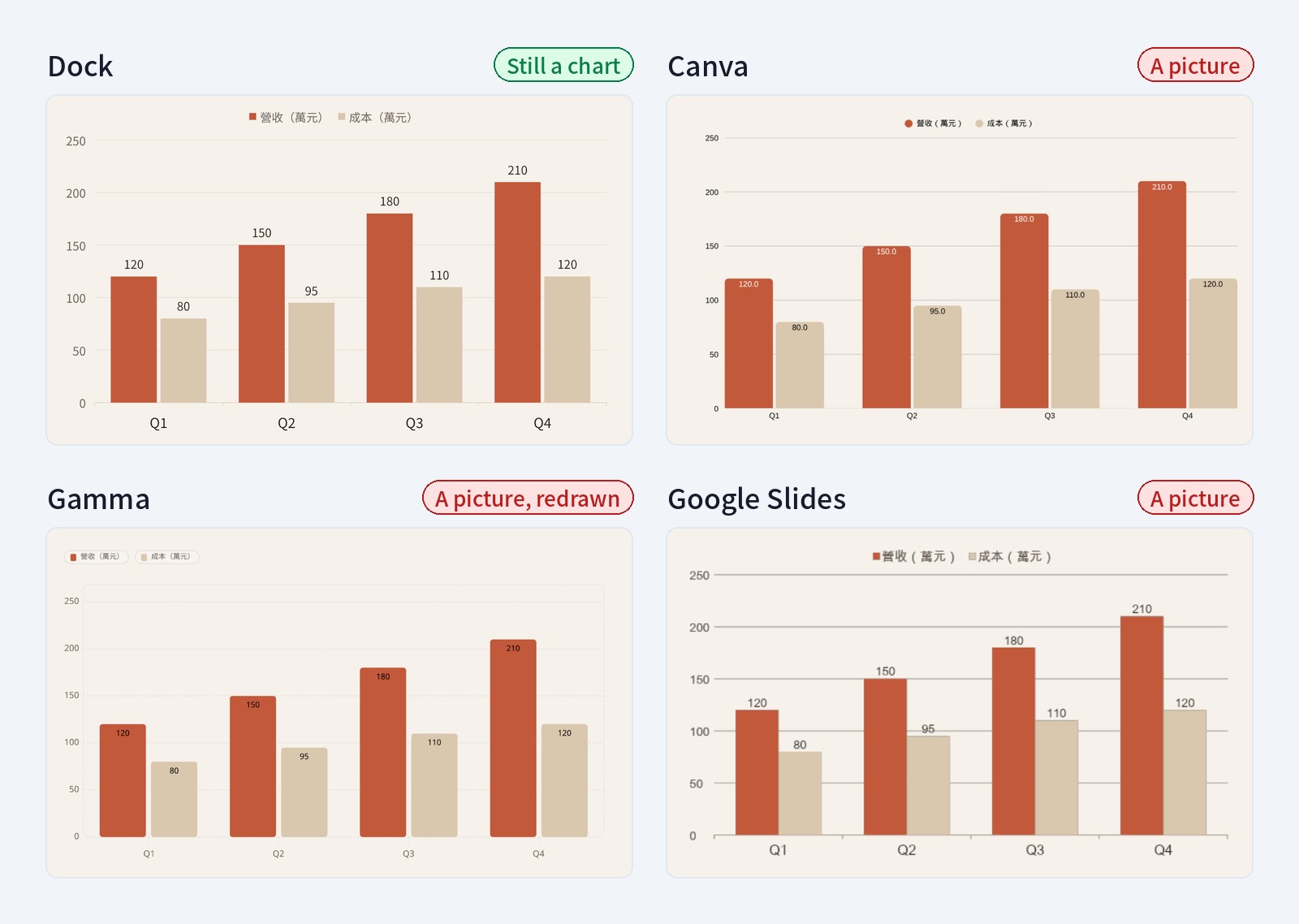
| A chart’s numbers have to stay editable | Dock | Its file still had the chart with its data. Google Slides, Canva and Gamma each returned a picture of the chart |
| You want AI to draft the deck | Dock or Gamma | From one nine-slide outline, Dock made a chart with its 8 values, a table and speaker notes; Gamma added photos |
| The deck is a design, next to social posts and posters | Canva | Canva AI drafted fastest, about 80 seconds, and Canva kept a video with its trim |
| You need to stay in Google Workspace | Google Slides | In the six-slide test it kept the transitions, the animation and the hidden slide |
What Google Slides lost
On November 20, 2026, we uploaded PowerPoint files to Drive, used File → Save as Google Slides, then File → Download → Microsoft PowerPoint, with a personal Google account. In the six-slide deck from our PPTX export test, Google Slides kept the fade, the push, the entrance animation, the hidden slide, the group, the crop, the speaker notes and the Chinese font. The chart came back as a picture, 600 × 355 pixels; Google’s help says charts from a PowerPoint file are converted to images (Work with Office files).
That deck’s chart is the first of nine files in Nine things only Dock keeps, each holding one harder feature. Google Slides kept most of the company template: the layouts, placeholders and slide-number fields, but not the layout names or the theme fonts. It lost the other eight, from SmartArt and review comments to the macros in a .pptm.
Google Slides alternatives, side by side
The same files went into each tool on November 20, 2026. The outline row is from our outline test on November 21.
| What came back | Google Slides | Dock | Canva | Gamma |
|---|---|---|---|---|
| Bar chart | A picture | A chart, with its data | A picture | A picture |
| Transitions, animation, hidden slide | Kept | Kept | Animation and fade dropped; slide no longer hidden | Dropped; hidden slide left out |
| Company template | Layouts kept; names and theme fonts lost | Kept | Every slide on Blank | One layout, DEFAULT |
| SmartArt | 12 shapes in a group | Kept | 15 freeforms and text boxes | 12 shapes and 3 pictures |
| Review comments and sections | Gone | Kept | Gone | Gone |
| A deck from a nine-slide outline | Not tested | 9 slides, chart with data, table, notes, about 2 minutes (Plus) | 9 slides in about 80 seconds; no notes, chart as shapes | 9 cards, photos on three or four, chart as a picture |
The ranking
1. Dock: for decks that have to stay PowerPoint files
Dock edits the .pptx itself, so the file you download is the one you worked on. In the six-slide test its file kept everything Google Slides kept, and the chart with its data as well. In the nine-file test it kept all nine features, the template’s layout names and theme fonts, the SmartArt, the comments, the sections and the .pptm macros among them.
Dock also writes decks from a prompt. In a Plus workspace at its Quick level, it made all nine slides of our outline in about 2 minutes, with a chart that holds its eight values, a table on slide 5 and speaker notes on every slide. On Free, the same request stopped at 5 of the 9 slides.
What to know: Free is one person, with 400 AI credits once and 3 exports a month. Plus, at US$12 a member a month, adds up to 10 members (pricing). In the six-slide test on November 20, Dock’s file was 9.98 MB and Google’s 7.22 MB; both carried the Chinese font Noto Sans TC, and that font was most of each. In our re-run on November 24, Dock added no font: the six-slide deck came back at 367,610 bytes, against the original’s 369,185. To move decks over, see Move from Google Slides to Dock: in our test all six slides matched, and only the chart needed rebuilding.
2. Canva: for decks that are designs first
Canva kept the table, the speaker notes and the link, and made the smallest file, 1.12 MB. It turned the chart into a picture, dropped the animation and the fade, turned the push into a fade and left the hidden slide in the file but no longer hidden. In the nine-file test it put every slide of the company template on Blank, but kept a video with its trim, which Google Slides turned into a still picture.
Canva AI was the fastest from the outline, at about 80 seconds, but its PowerPoint file had no speaker notes, and the chart and table were shapes and text boxes. More in Canva vs Dock.
3. Gamma: for a web deck with photos
Gamma wrote nine cards from the outline with photos on three or four of them, a table and speaker notes, and its English deck needed one fix. In that deck’s PowerPoint file the chart is a picture. In the six-slide round trip, Gamma also dropped the transitions and the animation and left the hidden slide out. A Gamma deck is meant to be presented from a link. More in Gamma vs Dock.
If your colleagues stay in Google Workspace
You can work in Dock and still hand decks to people who use Google Slides:
- To convert PowerPoint to Google Slides from Dock, export to Google Slides: Dock puts a copy of the deck in your Google Drive as a Google Slides presentation. It also exports to PowerPoint, Keynote and PDF (formats). Dock’s own export note says charts arrive in Google Slides as pictures that Dock draws, because Google Slides keeps only charts linked to Google Sheets.
- In a Dock presentation, File → Open… has a Google Drive tab that copies the deck you pick into Dock, converting a Google Slides file to
.pptxon the way.
We have not tested either path for this page.
When to stay with Google Slides
- Your team works in Google Workspace and the deck never has to be a PowerPoint file.
- Several people need to edit for free. Google’s Slides page lists editing together at the same time, and comments; we have not tested it. Dock’s Free plan is one person.
- The PowerPoint files you receive have no charts whose numbers you need to change, and no SmartArt, comments or sections to keep.
What we did not test
- Google Slides with Gemini.
- Copilot in PowerPoint: we have no Copilot seat.
- Opening the November 20 files in PowerPoint, Dock’s included. Those rows are read from the files.
- Other Google Slides alternatives. If a tool is not on this page, we have not tested it yet.
Frequently asked questions
What are the best Google Slides alternatives?
It depends on why you are leaving. For PowerPoint files that have to come back intact, Dock: in our November 20, 2026 tests it kept all nine harder PowerPoint features we tried, a chart with its data among them, where Google Slides kept part of one. For designs, Canva. For a web deck with photos from an outline, Gamma. If your team works in Google Workspace and the deck stays there, stay with Google Slides.
Does Google Slides keep charts from PowerPoint?
Not as charts. In our test the chart came back as a picture, 600 × 355 pixels, with no data behind it, and Google's help says charts from a PowerPoint file are converted to images. Dock's file still had the chart with its data.
Which Google Slides alternative keeps a PowerPoint company template?
In our test, Dock kept the template's layouts, their names, the placeholders, the slide-number fields and the theme fonts. Google Slides kept the layouts, placeholders and fields but renamed the layouts and changed the fonts to Arial. Canva put every slide on Blank, and Gamma left one layout named DEFAULT.
Is there a free Google Slides alternative?
Dock has a Free plan for one person with 400 AI credits once, up to 100 slides a run and 3 exports a month (pricing). When we tested, Free stopped our nine-slide request at 5 slides, the per-run cap it had then. Canva's free account made the whole nine-slide deck with Canva AI.
Can I move my Google Slides decks to Dock?
Yes. Download each deck as Microsoft PowerPoint and upload it to Dock. In our test all six slides matched, the transitions, animation, hidden slide and Chinese font included. Rebuild the charts that came into Google Slides from a PowerPoint file: Google Slides turned those into pictures. For a chart linked to a Google Sheet, take the numbers from the sheet.
Can I still send a Dock deck to people who use Google Slides?
Yes. Dock exports to Google Slides by putting a copy of the deck in your Google Drive, and its File → Open… dialog has a Google Drive tab that brings a Google Slides deck into Dock as a .pptx. Dock's export note says charts arrive in Google Slides as pictures, because Google Slides keeps only charts linked to Google Sheets. We have not tested either path.
Related
- Move from Google Slides to Dock, slide by slide
- Nine things only Dock keeps in a PPTX round trip
- PowerPoint alternatives that still give you a PPTX
- 4 Canva alternatives for presentations, tested
- 4 Gamma alternatives for PowerPoint, tested
The six-slide and nine-file tests ran on November 20, 2026: Google Slides with a personal Google account, Dock on its test service through its command line, Canva with a free account and Gamma 5 in a Pro workspace. The nine-slide outline test ran on November 21. Tools change; these are the results on those days.