
Nine things only Dock keeps in a PPTX round trip
Our PPTX export test ran one deck through four tools. Its deck had a chart, a table, animations and a hidden slide. Business decks carry more than that: a company template, SmartArt, review comments, a sensitivity label, macros. So we built nine more files, one for each of those things, and ran each through Dock, Canva, Gamma and Google Slides the same way: import, export back to PowerPoint, take the file apart.
The short answer: Dock’s files kept all nine. Canva’s, Gamma’s and Google’s kept none of them in full. Two results were close. Google Slides kept most of the company template, and Canva kept the video and its trim. The sections below say what each tool kept.
The test files
Download all nine test files (ZIP, 2.0 MB). They are free to use for your own tests.
Each is a short deck for the same made-up coffee brand as the export test, built with a script in the XML PowerPoint writes; the SmartArt parts and the VBA project were saved by PowerPoint:
| File | What it holds |
|---|---|
harbor-q3-original.pptx |
The export test’s deck: a bar chart with its data on slide 2 |
harbor-template-qbr.pptx |
A company template: 6 layouts of its own, placeholders, slide-number fields |
harbor-smartart-process.pptx |
A SmartArt process diagram (Increasing Arrows Process, 3 steps) |
harbor-video-training.pptx |
A 12-second video, trimmed 1 s at each end, a 0.5 s fade-in, 2 bookmarks |
harbor-review-comments.pptx |
Review comments: 3 authors, 4 threads, 3 replies, 1 thread resolved |
harbor-sections.pptx |
7 slides in 4 sections |
harbor-confidential.pptx |
A Microsoft Purview sensitivity label, Confidential, with its marking |
harbor-stores-morph.pptx |
A Morph transition on slides 3 and 4, shapes paired by !! names |
harbor-timeline-macro.pptm |
A macro-enabled deck with a VBA project |
The text in the decks is Traditional Chinese, as in the export test. The VBA project is the MIT-licensed PowerPoint slide timeline; its license is in the ZIP.
How we tested
| Tool | Date | What we used | How the file went in and out |
|---|---|---|---|
| Dock | November 20, 2026 | Dock (staging), through its command line | Upload, then download in the same format |
| Canva | November 20, 2026 | Canva on the web, a free account | Upload, then Share → Download → PPTX, All pages |
| Gamma | November 20, 2026 | Gamma on the web (Gamma 5), a Pro workspace | Import on the home page with no prompt, then Export → PowerPoint |
| Google Slides | November 20, 2026 | Google Slides on the web, a personal Google account | Upload to Drive, File → Save as Google Slides, then File → Download → Microsoft PowerPoint |
We read each file that came back with our own script: which layouts and placeholders each slide uses, whether a diagram is still SmartArt, what the video carries, which comment, section and label parts are in the package, which transition each slide has. We drew the slides with Dock’s renderer. We ran each file once in each tool.
What came back
| What was in the file | Dock | Canva | Gamma | Google Slides |
|---|---|---|---|---|
| A chart you can edit later (chart + workbook) | Kept | A picture, no workbook | A picture, no workbook | A picture, no workbook |
| A company template (layouts, placeholders, fields) | Kept | Every slide on Blank, no placeholders, no fields | One layout, DEFAULT, empty master | Partly: layouts, placeholders and fields kept; layout names and theme fonts lost |
| SmartArt | Kept | 15 freeforms and text boxes | 12 shapes and 3 pictures | 12 shapes in a group |
| A video with trim, fade and bookmarks | Kept | Partly: video and trim kept; fade and bookmarks lost | A still picture | A still picture |
| Review comments | Kept | None | None | None |
| Sections | Kept | None | None | None |
| Sensitivity label | Kept | None; the marking became text on every slide | None; the marking became text on every slide | None; the marking became a plain shape |
| Morph transition | Kept | Turned into a fade | No transition | No transition |
| Macros in a .pptm | Kept | Upload refused | Upload refused | Would not open; a converted copy downloads without macros |
Most of what disappears does not show on the slide. A deck with no sections or no comments looks the same as one with them. The loss shows up later: when a reviewer looks for the comment threads, when Office no longer sees the label, when a slide built on a layout has to be rebuilt by hand.
The chart, after an edit
The job: Q3 revenue was 190, not 180. Someone asks an AI agent to fix the bar on slide 2 and the two sentences that quote the number, then sends the file to finance, who edits the chart data in Excel.
In Dock, we made the edit with four commands from Dock’s command line, the same verbs an agent such as Claude Code sends through Dock’s MCP server. In the file that came back, the chart’s Q3 value and the embedded workbook’s cell B4 both read 190, the three texts were updated, and slide 2 still held a chart.
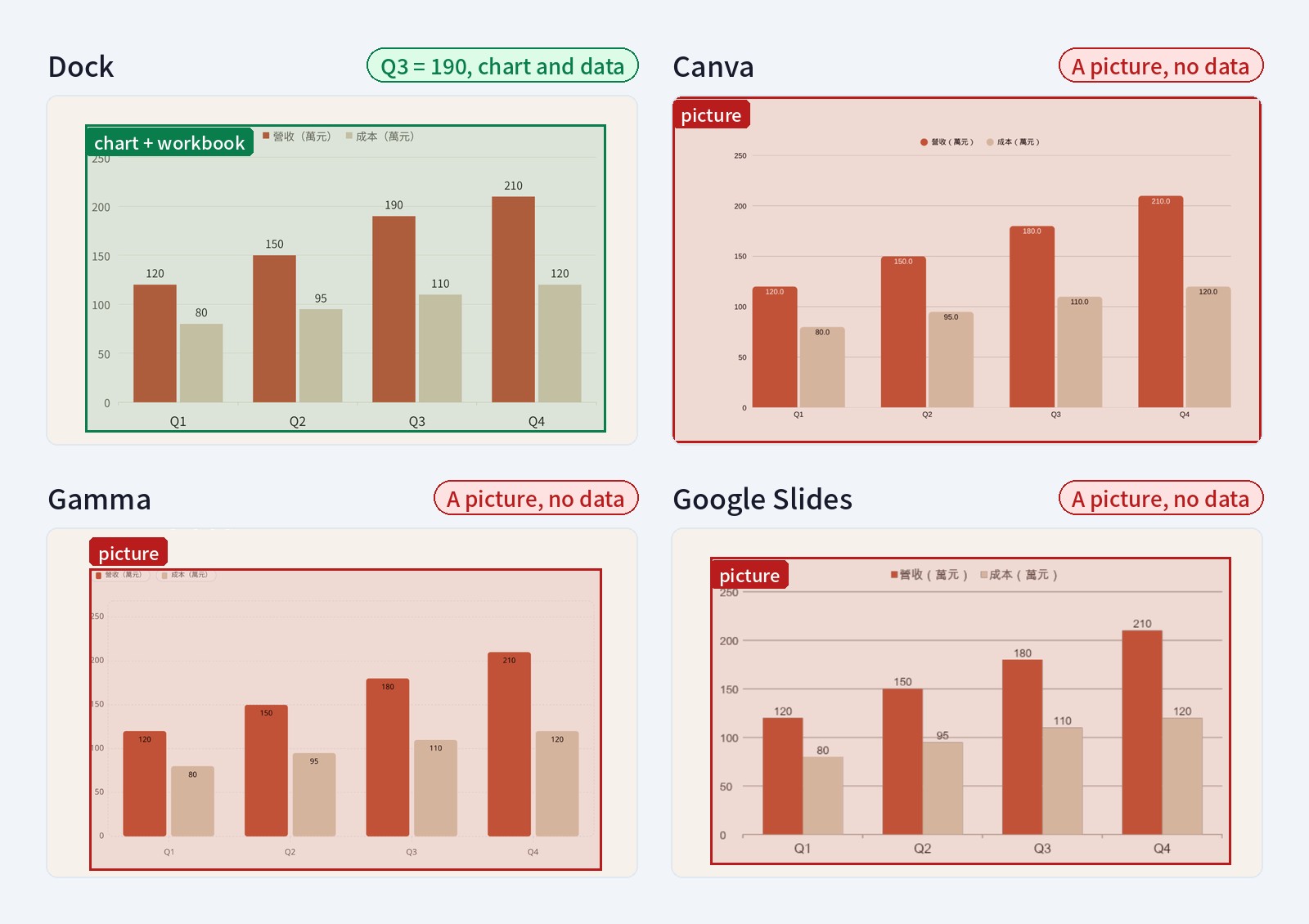
In Canva, Gamma and Google Slides the round trip alone removed the chart: slide 2 held a picture instead of a chart frame, and the file had no workbook. With no chart data left, no later edit in those tools can change the chart’s numbers; only the picture or a new chart can. We did not ask their AI assistants to make the edit, so we did not test whether they can.
A company template
The job: the company’s template has its own layouts (cover, title and content, two columns, section header), placeholders and slide numbers. A deck made on it goes through a web tool and comes back to people who keep adding slides from those layouts.
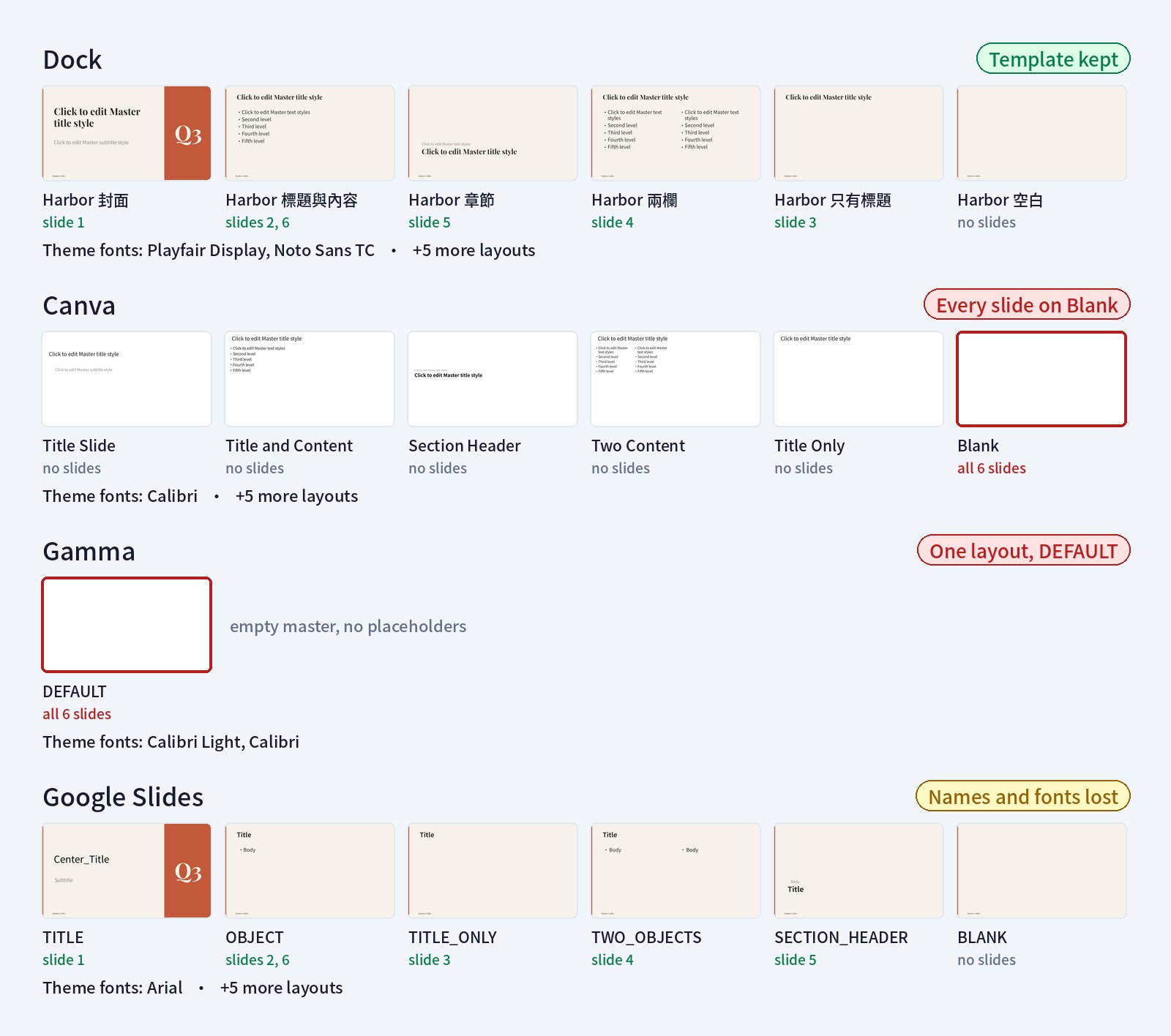
- Dock wrote back the same layouts, each slide on the one it used, with the same placeholders, slide-number fields and master graphics.
- Canva wrote 11 stock layouts and put every slide on Blank, with no placeholders and no slide-number fields. The brand bar and wordmark were no longer on the master, and the theme font became Calibri.
- Gamma wrote one layout, named DEFAULT, on an empty master, with no placeholders and no fields. Its theme fonts became Calibri Light and Calibri.
- Google Slides kept most of the template: each slide on a matching layout, the title, body, footer and slide-number placeholders, the slide-number fields, the wordmark and brand colour on the master. It lost two things: the layout names became Google’s (
TITLE,OBJECT,TITLE_ONLY,TWO_OBJECTS,SECTION_HEADER), and the theme fonts, Playfair Display and Noto Sans TC, became Arial.
So Canva and Gamma flatten every slide onto a blank layout, and only Dock keeps the template’s layout names and theme fonts.
SmartArt
The job: a three-step process drawn as SmartArt, which the next person edits as SmartArt: add a step, change the layout, retype a step.
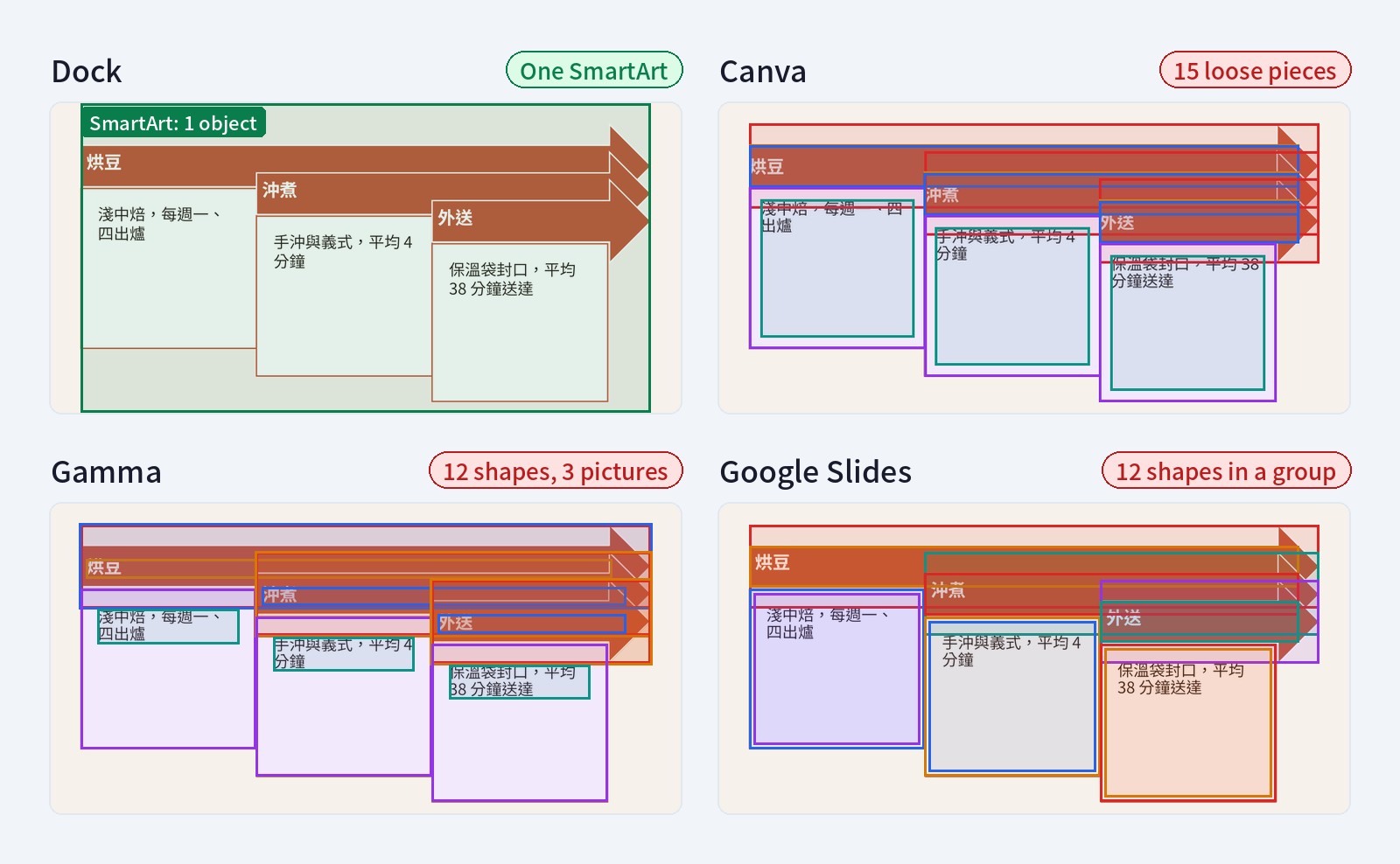
Dock’s file kept the SmartArt: its five parts, the Increasing Arrows Process layout and all six texts. Canva turned it into 15 separate pieces, 9 freeforms and 6 text boxes, Gamma into 12 shapes and 3 PNG pictures, Google Slides into 12 shapes in one group. The diagram still looks right in their files, but it is no longer SmartArt, so changing a step means moving shapes by hand. When Gamma imported the file, its message said it had found no tables or charts it could not convert, and said nothing about the SmartArt.
A video with trim, fade and bookmarks
The job: a training deck embeds a 12-second clip. In PowerPoint, the trainer trimmed a second off each end, added a half-second fade-in, and set two bookmarks, at 3 and 7 seconds, to jump to while presenting.
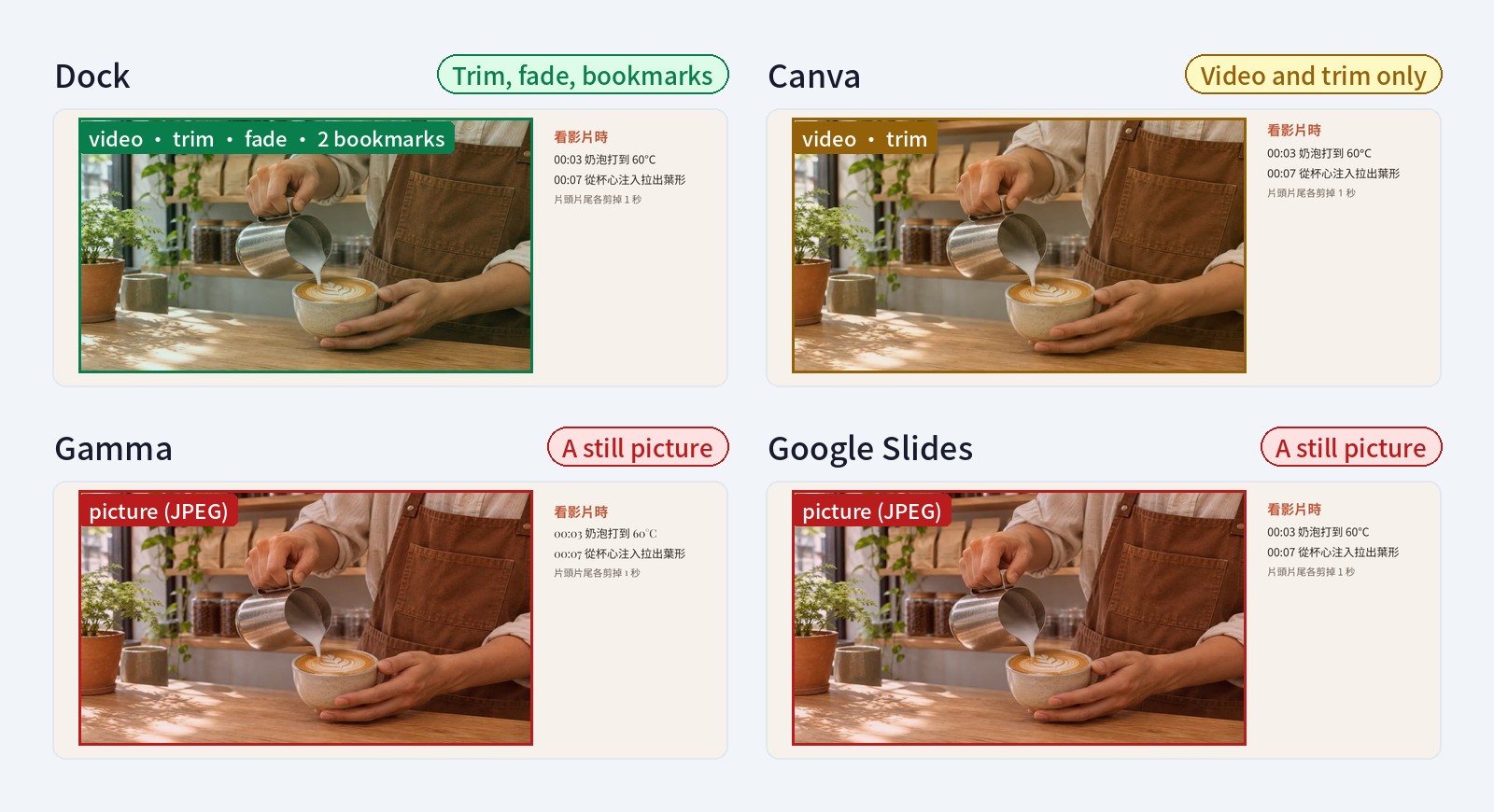
- Dock kept the same video file (817,246 bytes), the trim, the fade-in and both bookmarks.
- Canva kept a video and its trim. It re-encoded the clip (1.42 MB, still 12 seconds) and dropped the fade-in and both bookmarks. Its download panel warned that videos would not play in a PPTX; the video was in the file anyway. We did not check whether it plays in PowerPoint.
- Gamma and Google Slides each wrote a JPEG picture on slide 2, with no video in the file.
So Gamma and Google Slides turn the video into a still picture, and only Dock keeps the fade and the bookmarks.
Review comments
The job: three people reviewed the deck in PowerPoint: four comment threads, three replies, one thread marked resolved. The deck goes through a web tool before the review is finished.
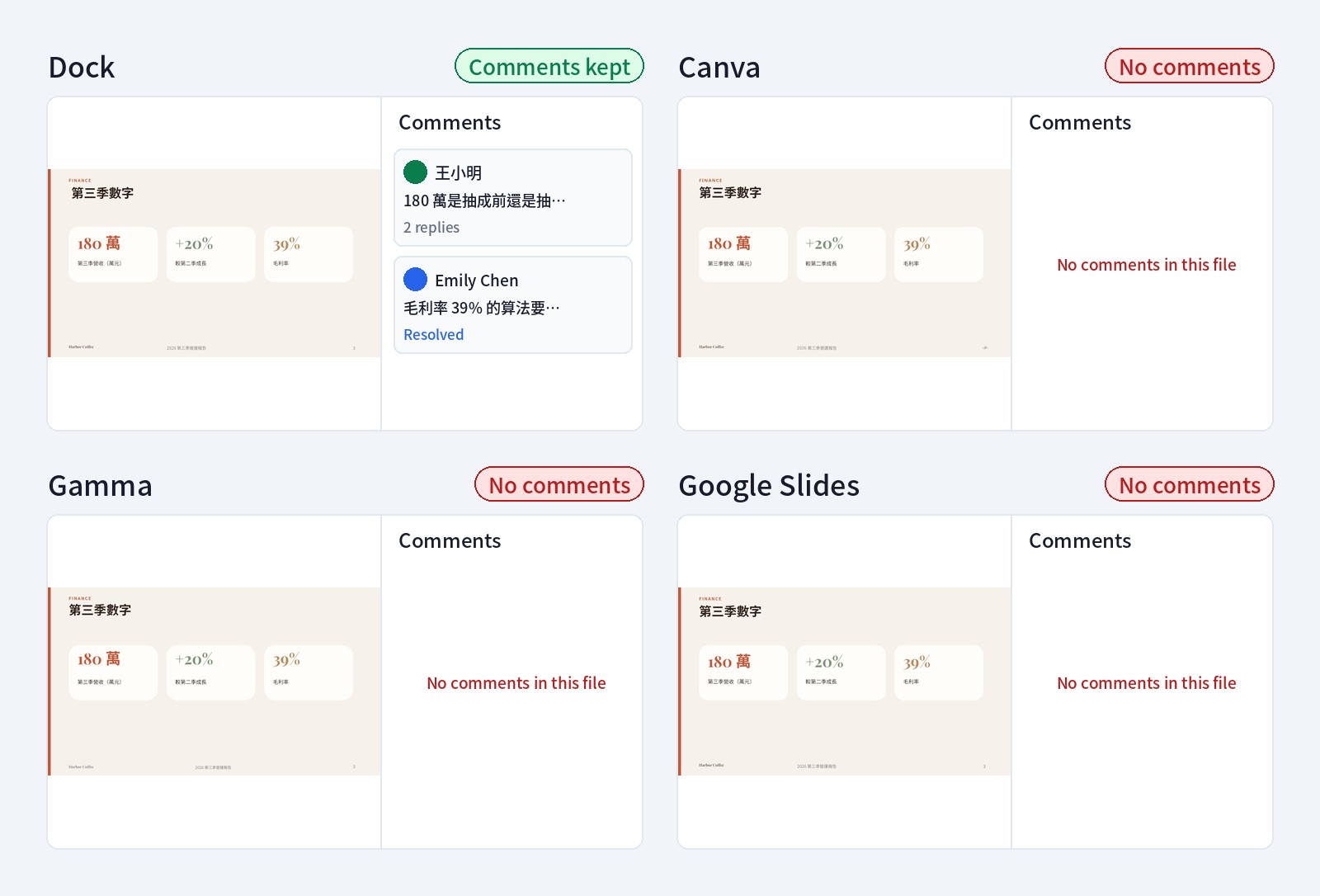
Dock’s file kept the three authors, the four threads, their replies and which thread is resolved. Canva’s, Gamma’s and Google’s files held no comments at all: no comment part and no author list in the package.
Sections
The job: a seven-slide deck is organised in four sections (opening, results, next quarter, appendix), so a presenter can collapse, move or skip a section at a time.
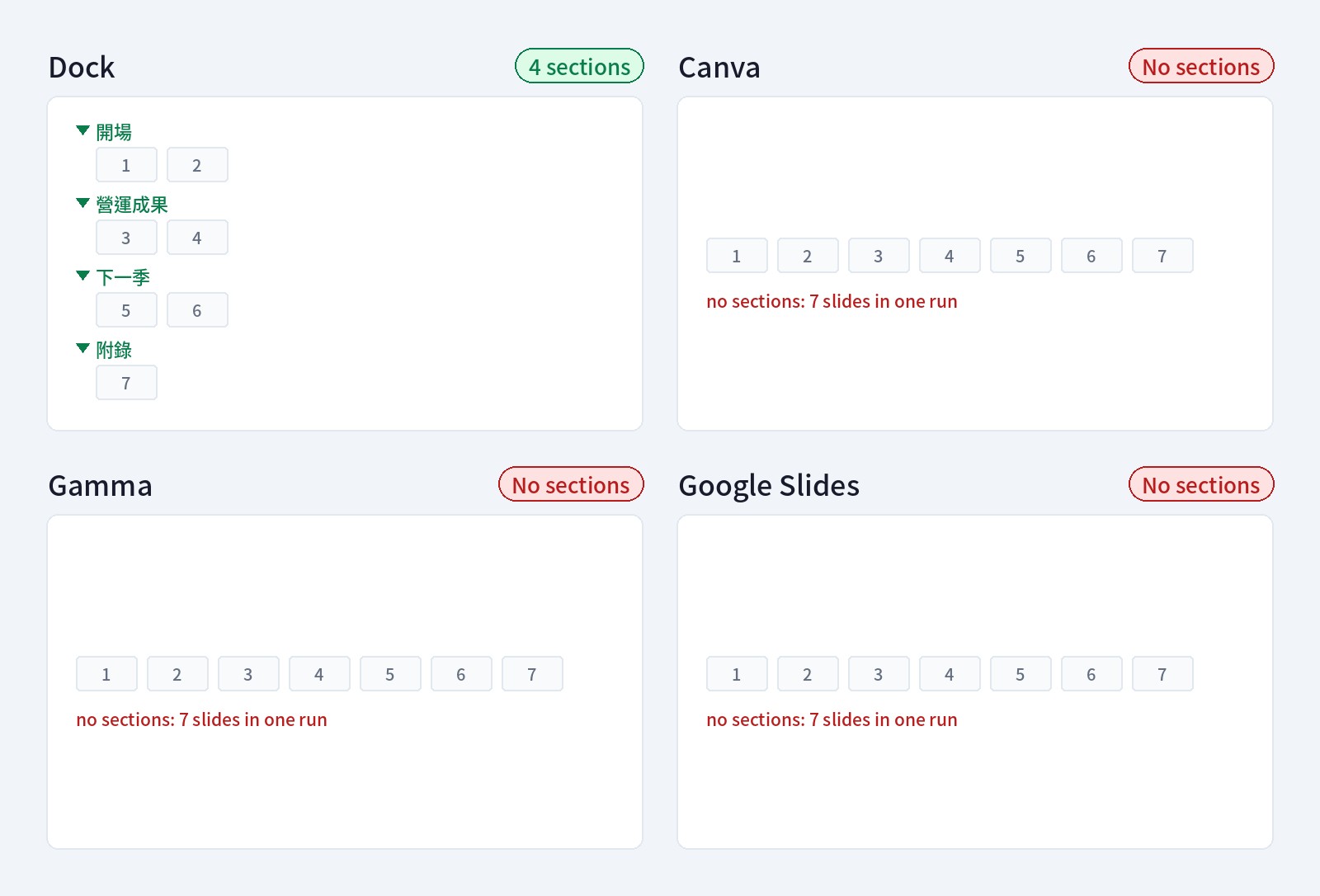
Dock’s file kept the four sections with their names and slides. Canva’s, Gamma’s and Google’s had none; the slides were all there, in order, in one run. Google’s slide panel showed no section headers either.
A sensitivity label
The job: the deck is labelled Confidential in Microsoft Purview, and the label puts a marking at the top of every slide. Office reads the label from the file, and so do the policies that act on it.
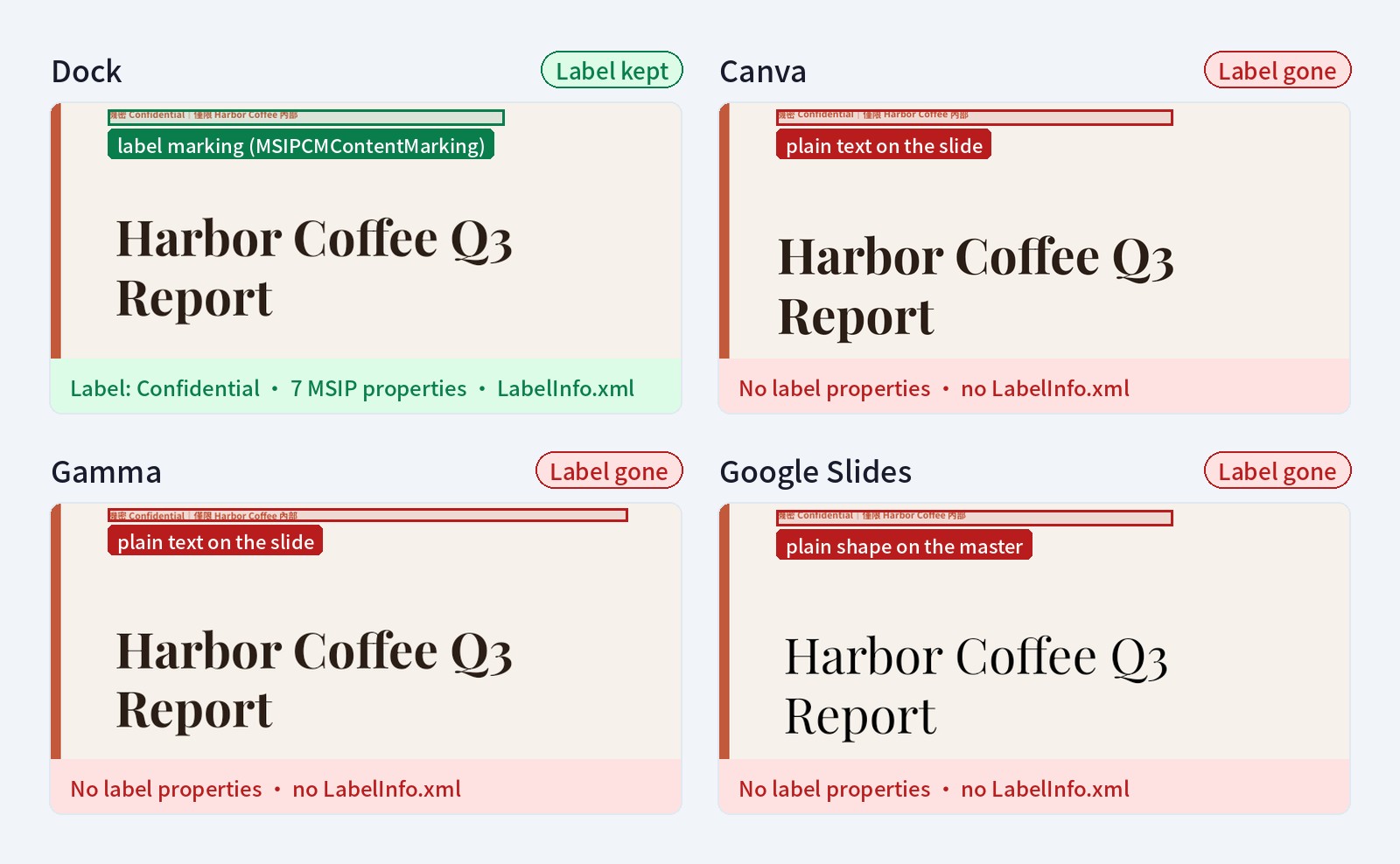
Dock’s file kept the label’s seven properties, the label information part (LabelInfo.xml) and the marking shape on the master. Canva’s, Gamma’s and Google’s files had no label properties and no label information part. The marking’s words survived: Canva and Gamma copied them onto all six slides as plain text, and Google kept them on the master as an ordinary shape. Neither is the marking shape a label writes (MSIPCMContentMarking), and with the label properties gone the file is no longer labelled, though it still looks it.
A Morph transition
The job: slides 3 and 4 use Morph, so the three store tiles glide to their new places. The tiles are named with !! so PowerPoint pairs them from slide to slide.
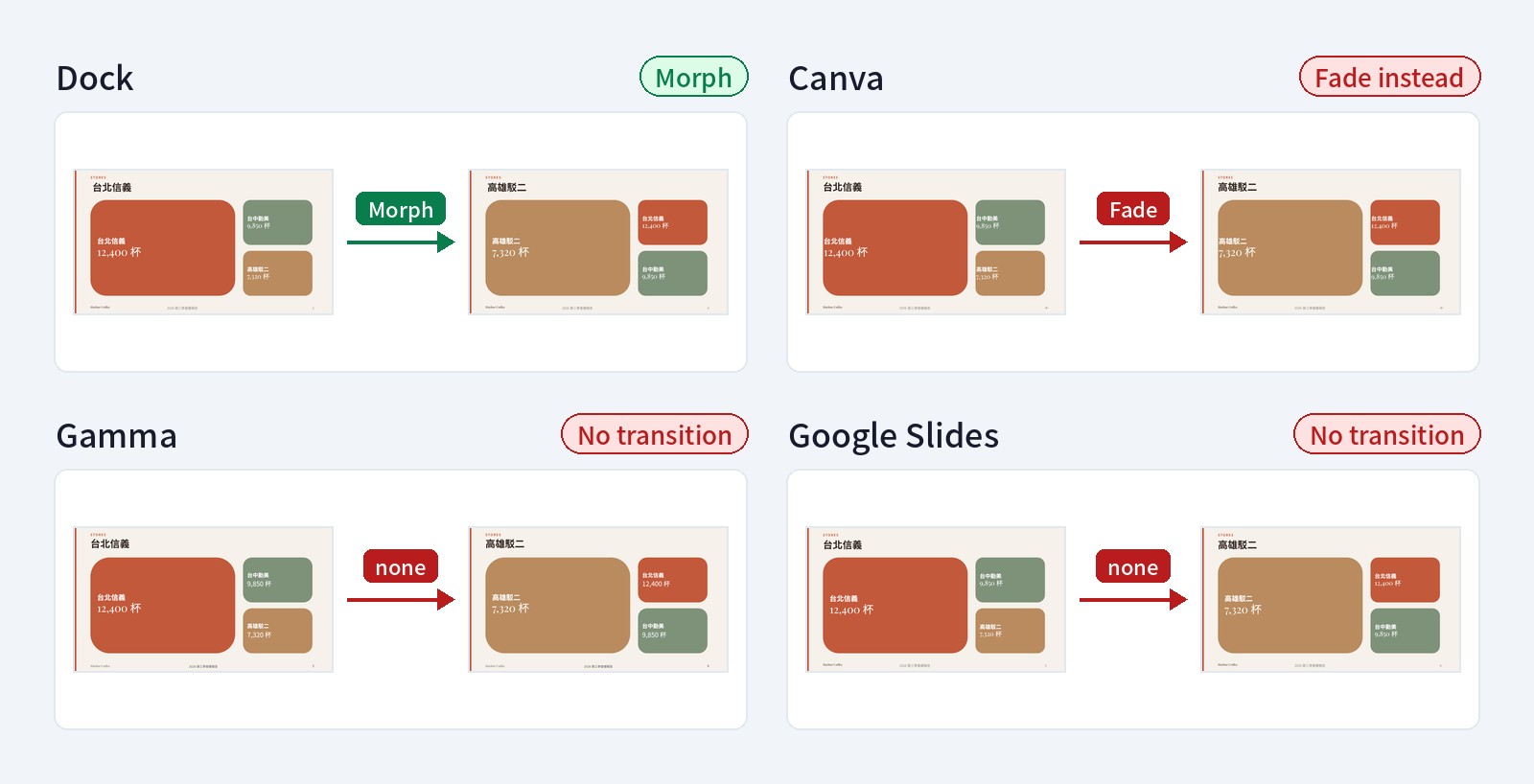
Dock’s file kept Morph on slides 3 and 4, the !! names and every tile’s position. Canva wrote a fade on those slides, PowerPoint’s fallback for Morph, without the !! names; the file still has a transition, so the loss is easy to miss. Gamma’s and Google’s files had no transition on any slide.
Macros in a .pptm
The job: a training team keeps a macro-enabled deck whose VBA draws a progress timeline on every slide. Someone edits its text in a web tool, and the deck has to come back as a .pptm with the macro.
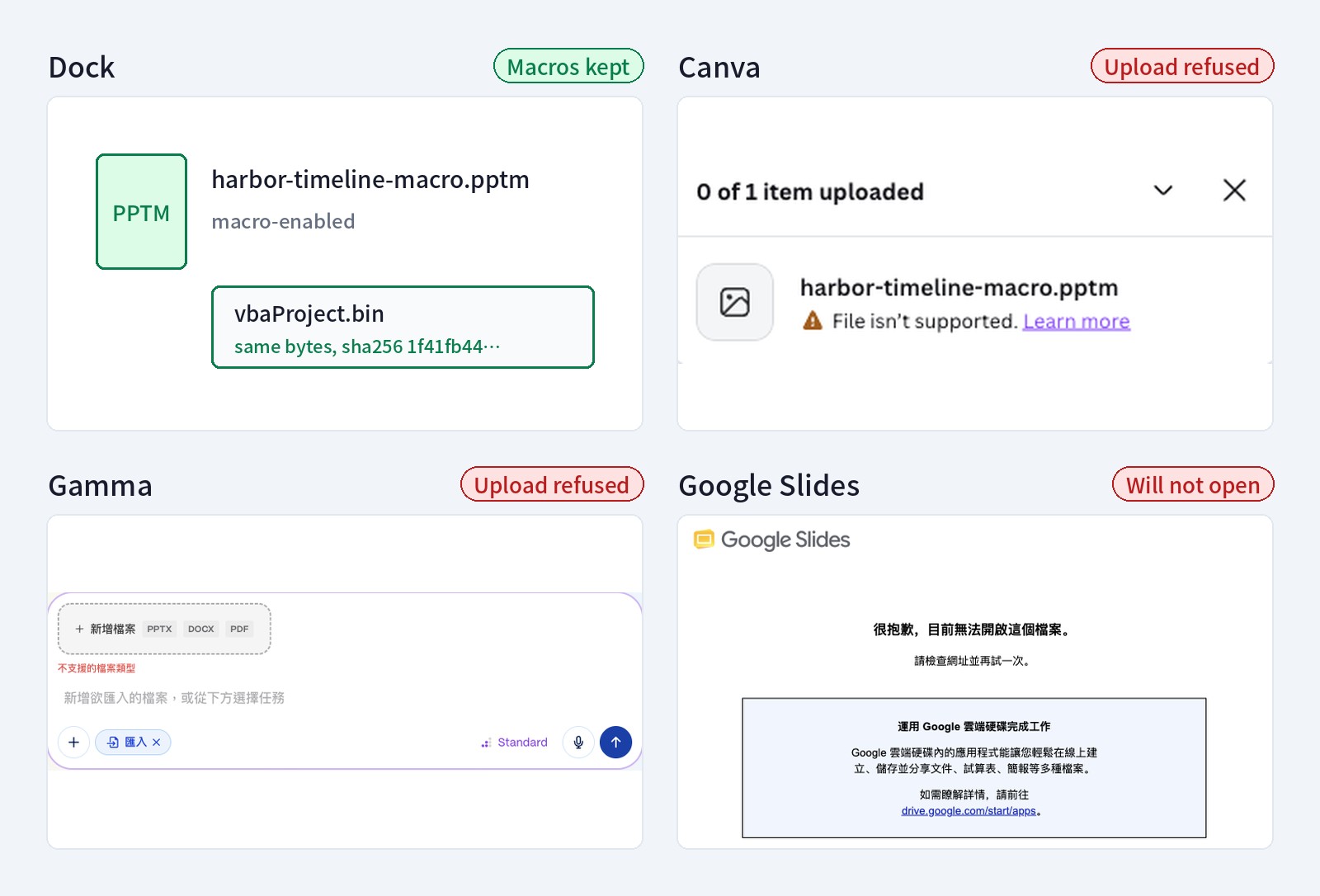
Dock’s download was a .pptm with the macro-enabled content type, and its VBA project was byte for byte the original’s. Canva refused the upload (“File isn’t supported”). Gamma refused the attachment as an unsupported file type. Google Slides could not open the .pptm in its editor; Drive’s Open with → Google Slides converted it, but its download menu has no .pptm (its PowerPoint choice is .pptx), and that .pptx had no VBA project.
What we did not test
- PowerPoint. No file was opened in PowerPoint: not the originals, not Dock’s files, not the others’. Every result is read from the files. Canva’s kept video and Google’s kept layouts may or may not behave in PowerPoint.
- A real label. The sensitivity label is made up, with a label id and tenant of our own; we did not use a real Purview tenant.
- The other tools’ AI. For the chart, we ran a plain round trip in Canva, Gamma and Google Slides, and did not ask their assistants to make the edit.
- Repeats and plans. One run per tool and file. Canva on a free account, Gamma on Pro, Google on a personal account.
- Dock’s editor. We checked Dock’s files, not its editor: we did not open the section list, the comment panel, the video or Morph playback in Dock.
Dock’s files are bigger than the originals. Every Dock export adds Noto Sans TC, about 9.6 MB, so the Chinese text looks the same on another computer, and leaves out the original’s thumbnail picture. Gamma’s files were 14.5 to 15.2 MB and Google’s 7.1 to 7.5 MB, for inputs of about 90 KB.
More comparisons
- PPTX export test: Dock, Canva, Gamma, Google Slides: the first deck, with the chart, table, animations and hidden slide.
- Dock vs Canva vs Gamma vs Google Slides vs Copilot: one table across fidelity, formats, AI and prices.
Frequently asked questions
Which tools keep SmartArt when they export to PowerPoint?
In our test, only Dock. Canva, Gamma and Google Slides each turned the diagram into ordinary shapes, and Gamma added pictures. It looks the same, but it is no longer SmartArt.
Do review comments survive a round trip through Canva, Gamma or Google Slides?
Not in our test. Their files held no comments and no author list. Dock's file kept the authors, the threads, the replies and which thread was resolved.
Does Google Slides keep a company template?
Mostly. It kept each slide's layout, the placeholders and the slide-number fields, but renamed the layouts and changed the theme fonts to Arial. Canva and Gamma put every slide on a blank layout. Dock kept the layout names and theme fonts too.
Can I edit a macro-enabled .pptm in these tools?
Canva and Gamma refused the upload, and Google Slides converted it to a copy without macros. Dock opened it and gave back a .pptm with the same VBA project.
Can I run this test myself?
Yes. Download the nine test files from this page, import each into the tool, download it as PowerPoint again, and look for the sections, comments, SmartArt or label in PowerPoint.
Measured by us on November 20, 2026, on Dock staging and the web apps of Canva, Gamma and Google Slides; every file read with the same script and drawn by Dock’s renderer (OfficeKnife 1.318.0). All four products may change with updates.