
Keynote to PowerPoint, without the font surprises
A Keynote file looks right on your Mac and wrong on a colleague's Windows PC. Dock opens the .key file in your browser, lets you replace Mac fonts, and exports a PowerPoint your colleague can edit, or a Keynote file again.


Works on the Free plan. Downloads have no watermark.
Why fonts break when you send Keynote to PowerPoint
Keynote decks often use fonts that come with macOS, such as Helvetica Neue or PingFang. A Windows PC doesn't have them, so PowerPoint swaps in another font and lines wrap in new places.
The exported file still names the Mac font, so nothing looks wrong until the deck opens on someone else's screen. Fix the fonts before you send the PPTX walks through the switch on a real deck. If you only need to read or change a .key file, you can open it on Windows without converting.
What Dock keeps when it converts a Keynote file
Every slide, skipped ones too
Slides you skipped in Keynote stay in the deck as hidden slides, so nothing goes missing.
Movies that play
A movie that is too large, or in a format browsers can't play, is converted before the deck opens.
A list of anything left out
When the deck opens, Dock lists what it couldn't carry over, such as an animation or a link, so you can fix it before you send the file.
Replace a font across the deck
Replace Fonts lists the fonts it can replace. Pick a Mac font such as Helvetica Neue and a font Windows has, such as Arial, and Dock switches it in the text of every slide, layout and master at once. A chart's axis labels and legend, and Asian-language text that takes its font from the theme, keep the old font.
A real example: one Keynote deck, converted in Dock
We made a five-slide deck in Keynote 15.3 on the Basic White theme, with two masters, a logo and a red title. We uploaded it to Dock and downloaded the PowerPoint. You can download the Keynote file; the result is shown as screenshots.



What stayed editable
- All five slides came over, and Dock reported nothing left out.
- The two Keynote masters became two slide layouts, "Title" and "Title & Bullets", with the logo on each.
- Titles, subtitles and bullets are placeholder text you can type into.
- The red "Results" title on slide 3 stayed red.
What changed, and the limits
- The PowerPoint names Helvetica Neue, the theme's font, and embeds no font. Windows doesn't come with Helvetica Neue, so PowerPoint there draws the text in another font. Switch it to Arial first.
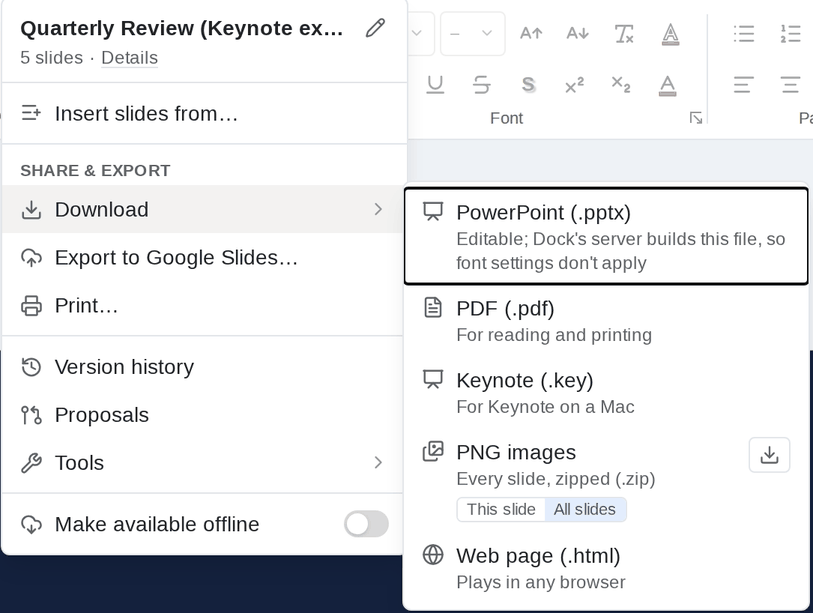
- Dock's server builds the PowerPoint download, so the Download menu's font settings don't apply to it. The menu says so.
- Slide 1 has an empty text box, shown as "Click to add text" while you edit. It is Keynote's unused Author and Date box.
Convert Keynote to PowerPoint in three steps
- 1
Upload
Sign in to Dock and upload your .key file.
- 2
Check
Look through the slides in the editor. Use Replace Fonts to switch a Mac font to one Windows has.
- 3
Download
Download a PPTX, download it back as Keynote, or export a copy to Google Slides.
Frequently asked questions
Can I convert a Keynote file without a Mac?
Yes. Dock opens .key files in the browser, so you can convert one on Windows or Linux.
Will the fonts change?
They can, when the deck uses fonts the other computer doesn't have. In our example the PowerPoint names Helvetica Neue and embeds no font. Use Replace Fonts to switch it to a font both computers have, such as Arial, before you download. Replace Fonts leaves a chart's axis labels and legend, and Asian-language text that follows the theme's font, so check those slides too.
Can I send it back as Keynote?
Yes. Dock exports both PowerPoint (.pptx) and Keynote (.key) files.
Is there a watermark?
No. No plan adds a watermark, Free included. The Free plan includes 3 exports a month.
Start from the slides you have
Upload the Keynote file, fix what you need, then download a PowerPoint.