
Resume to presentation: interview slides from your CV
Dock turns the resume you already have into a presentation, with what to say written in the speaker notes.
Sign in to Dock and turn your resume into a presentationSign in to Dock to start. Your resume stays in your own private files.
A real example: a one-page resume, made into a 10-minute talk
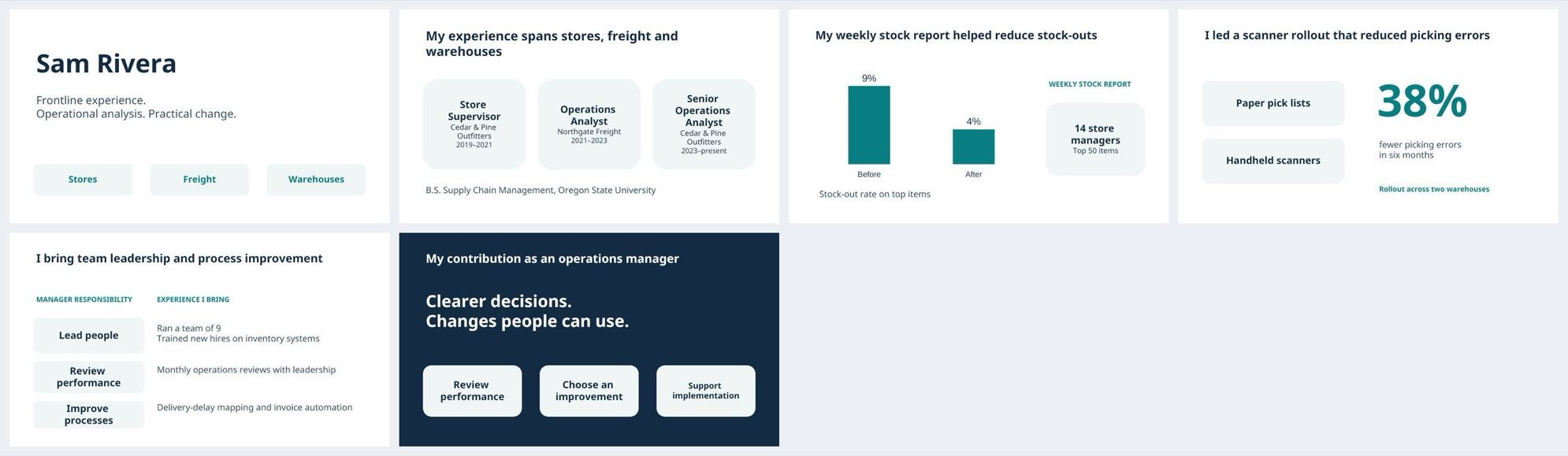
When the panel asks for ten minutes on who you are and what you'd bring, start from the resume you already have. We wrote a one-page resume for a made-up operations analyst, uploaded the PDF to Dock and asked Dock AI (the Agent in Dock) for a 10-minute interview presentation for an operations manager role. We read its plan and replied OK. You can download the resume and the slides. Result: 6 slides, 1 PowerPoint chart, and a timed script in the notes of every slide.
What the Agent did
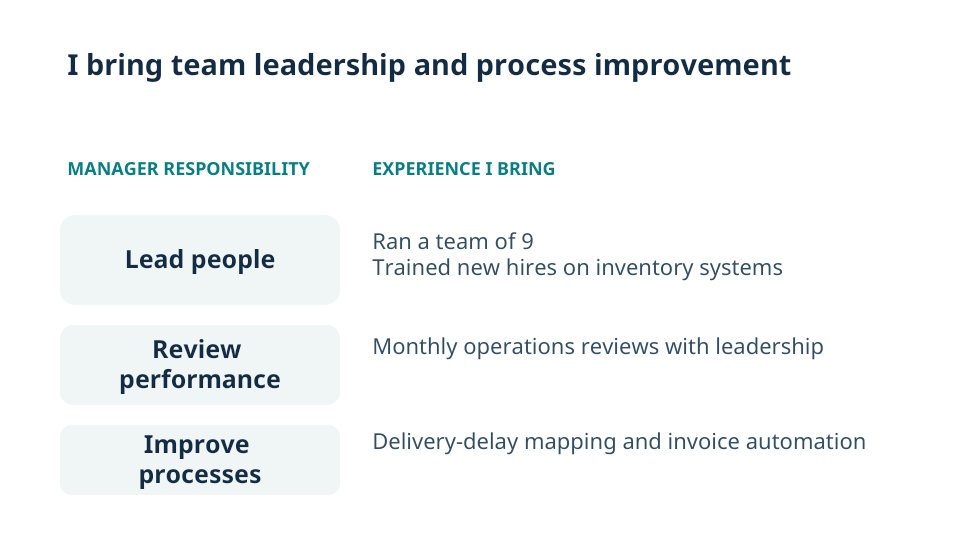
- It planned six slides in three parts (who I am, evidence, what I would bring) and waited for our OK.
- Each slide's speaker notes hold a script with a time: 1, 1.5, 2, 2, 2 and 1.5 minutes, 10 in all, as we asked.
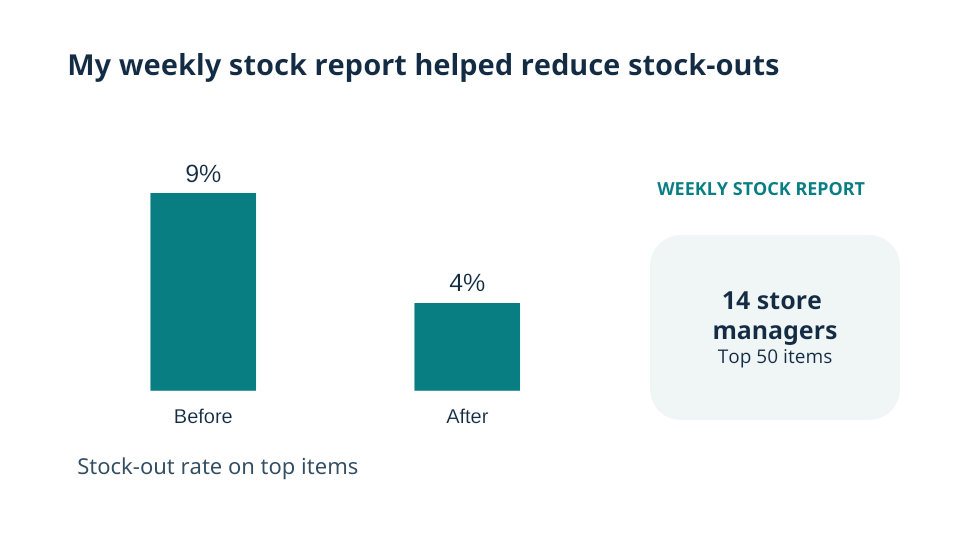
- It used only the resume's own figures: 9% to 4% stock-outs, 38% fewer picking errors, a team of 9.
- It noticed that the summary says five years while the jobs listed start in 2019, and kept "five years" off the slides.
- It added no stock photos and no portrait. The chart is a PowerPoint chart, and the text is editable.
What to check
- It starts from a resume you have. We didn't test writing one from scratch.
- We didn't give it a job description, so the fit to the role is general. Paste the job ad into your message for a closer match.
- The figures come from the resume and nobody checked them. Make sure you can explain each one.
- We checked the slides in Dock and the contents of the downloaded file, not in PowerPoint itself, so PowerPoint may draw them a little differently.
- We ran this example on a test copy of Dock on 2026-11-23. If Dock gives you a different result, tell us through Help.
How to turn your resume into a presentation
- 1
Upload your resume
In Dock, choose New ▸ Upload file… and pick your resume as a PDF.
- 2
Say what the talk is for
On Home, press + ▸ Other sources ▸ Pick items on Dock (on a Home with a paperclip instead of +, it is paperclip ▸ Pick items on Dock) and pick the resume. Then say the role, who is listening and how many minutes you have.
- 3
Read the plan, then say OK
The Agent shows the outline and slide count first and builds the slides after you say OK.
Before the interview
Practise from the notes
Each slide's notes hold what to say and how long to take, so you can rehearse against the clock. The rest of the prep, from the brief to a backup copy, is in how to prepare an interview presentation.
Change only the slides you name
Ask the Agent to rework one slide, and it leaves the rest alone. If you don't like it, use Undo these changes.
Bring the file they ask for
Download PowerPoint, Keynote or PDF, or export to Google Slides.
Frequently asked questions
How do I convert my resume into a PowerPoint presentation?
Upload the resume PDF to Dock, pick it on Home with + ▸ Other sources ▸ Pick items on Dock, and say the role and how long you have. The Agent shows a plan, builds the slides after you say OK, and you download them as PowerPoint, Keynote or PDF.
What should a presentation about myself for an interview include?
In our run, the Agent planned six slides: your name and a one-line pitch, a career timeline, two pieces of evidence with numbers, how your experience fits the role, and a close. It took the evidence from the resume.
Will it make up achievements I don't have?
In our run it used only figures from the resume, and it flagged one line in the resume that didn't match the dates. Check every number before the interview.
Can it write what I should say?
Yes. In our run, every slide had a script in its speaker notes with a time, adding up to the 10 minutes we asked for.
Can I tailor it to one job?
Paste the job ad into your message along with the resume. We didn't give one in our run, so the fit to the role stayed general.
Start from the resume you already have
See the plan, say OK, then practise from the notes.
Last updated