
Canva vs Dock: which PPTX can you keep editing?
Canva and Dock can both make a deck and give you a .pptx. The difference is what that file is for.
- Canva: the design lives in Canva. A PPTX is one of its download formats, next to PDF, PNG and MP4, and it is made for people to look at.
- Dock: the deck is the
.pptx. What you and your agent edit is that file, and what you download is the same file.
You can’t see this on the first slide. You see it when someone opens the file in PowerPoint and tries to change a number in a chart.
How we tested
On November 15, 2026, we made the same six-slide deck in both: a bar chart, a table, Traditional Chinese text, titles in Playfair Display, shapes in a group, a cropped picture, a transition, an entrance animation, speaker notes, a hidden slide and a hyperlink. Each tool went two ways:
- Made in the tool: we built the deck in Canva’s editor and in Dock, then downloaded each as PPTX.
- Round trip: we took one PPTX saved by PowerPoint, imported it into each tool and downloaded it again.
We took every downloaded file apart, then opened it in PowerPoint for Windows (Microsoft 365, version 16.0.20527.20196), took a picture of every slide, and tried editing a chart value, a table cell and a line of text in PowerPoint.
The Dock deck was built by an agent connected to Dock and downloaded the same way; we did not build it by hand in the editor.
What is in the file
| Feature | Canva’s PPTX | Dock’s PPTX |
|---|---|---|
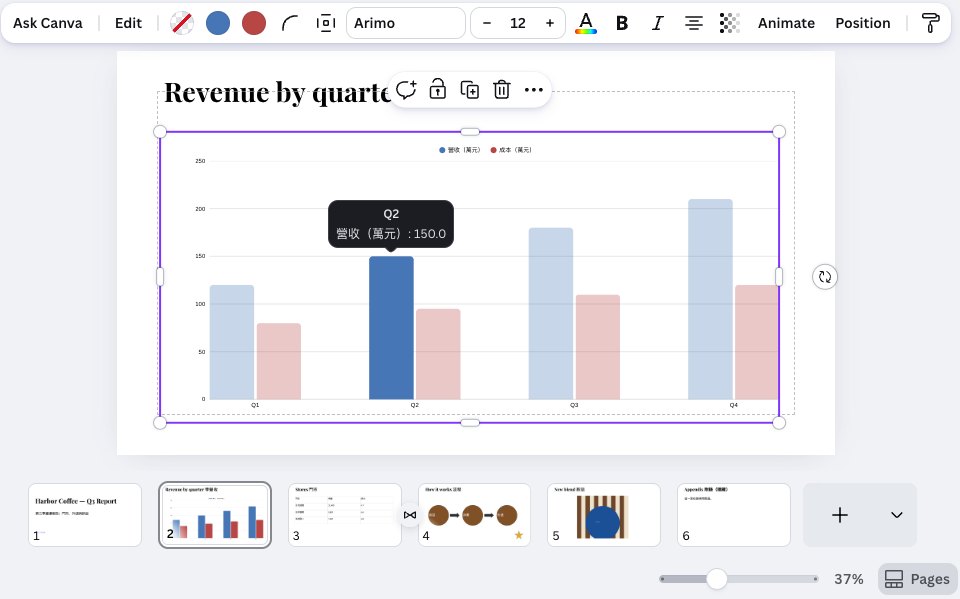
| Bar chart | A picture (PNG), both made in Canva and imported. In Canva’s editor it is a live chart | A PowerPoint chart with its data. In PowerPoint we changed a value to 999 and the chart took it |
| Table | A real table you can edit. On the round trip the table style (header colour, banded rows) was lost | A real table you can edit, with its style |
| Text | Kept, editable | Kept, editable |
| Chinese font | The fonts in the file have no Chinese characters (we checked 24 characters: 0 of 24). Canva’s font search did not find Noto Sans TC either | The Chinese text names Noto Sans TC, and the font is in the file |
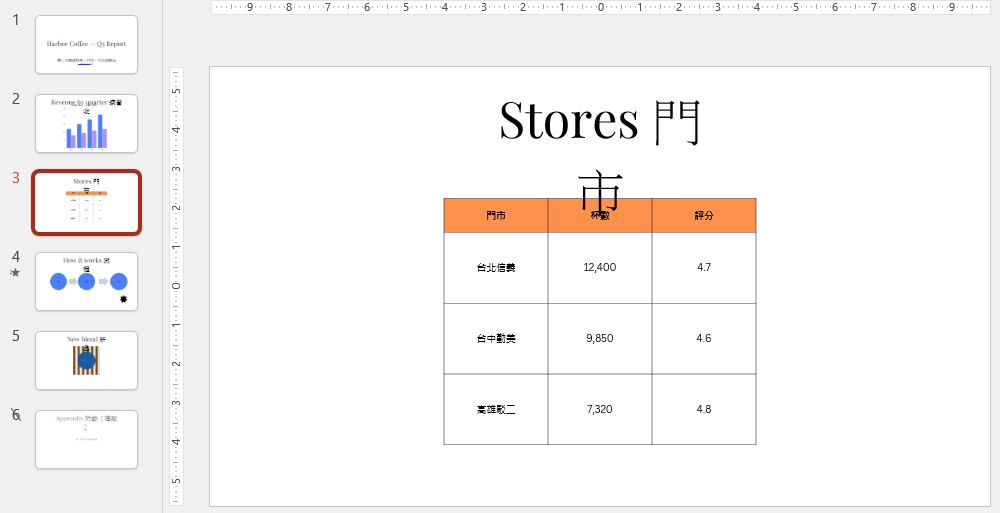
| Layout in PowerPoint | The titles on slides 2–6 wrap onto a second line in the deck made in Canva; on slide 3 the second line sits on the table | Looked the same as in Dock |
| Transitions | Made in Canva: the push on slide 4 was kept. Round trip: the fade on slide 1 was dropped and the push on slide 4 became a fade | The fade and the push were kept on both routes |
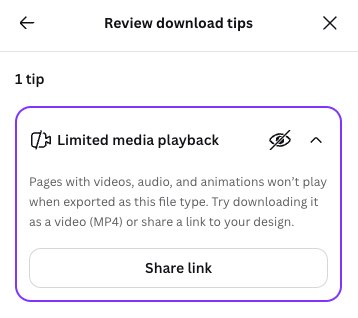
| Entrance animation | All dropped. Canva warns you before the download | Kept: a fade on the group |
| Group | Made in Canva: the group was kept, but each shape became a freeform with a separate text box. Round trip: the group was taken apart on import | Kept as a group; the shapes are still an ellipse, right arrows and a star |
| Cropped picture | A freeform shape filled with the whole picture, not a cropped picture, and the picture was recompressed (58 KB → 97 KB). On the round trip the crop moved | A picture with its crop, kept |
| Hidden slide | The default download leaves the hidden slide out. Choose All pages and it stays hidden. Round trip: lost on import | Kept as hidden |
| Hyperlink | Kept | Kept |
The chart is a picture
In Canva’s editor the chart is a live chart: point at a bar and you see its value. In the PPTX it is a PNG. It looks the same in PowerPoint, but there is no data behind it to change; to update a number, you go back to Canva and download again.
In Dock’s file the chart is a PowerPoint chart. In PowerPoint we changed the first value from 120 to 999, and the chart’s data took the new value.
Titles that wrap in PowerPoint
Opened in PowerPoint, the deck made in Canva had its titles on slides 2–6 broken onto a second line. On slide 3 the second line lands on the table. This is the desktop app on Windows, not only a picture export.
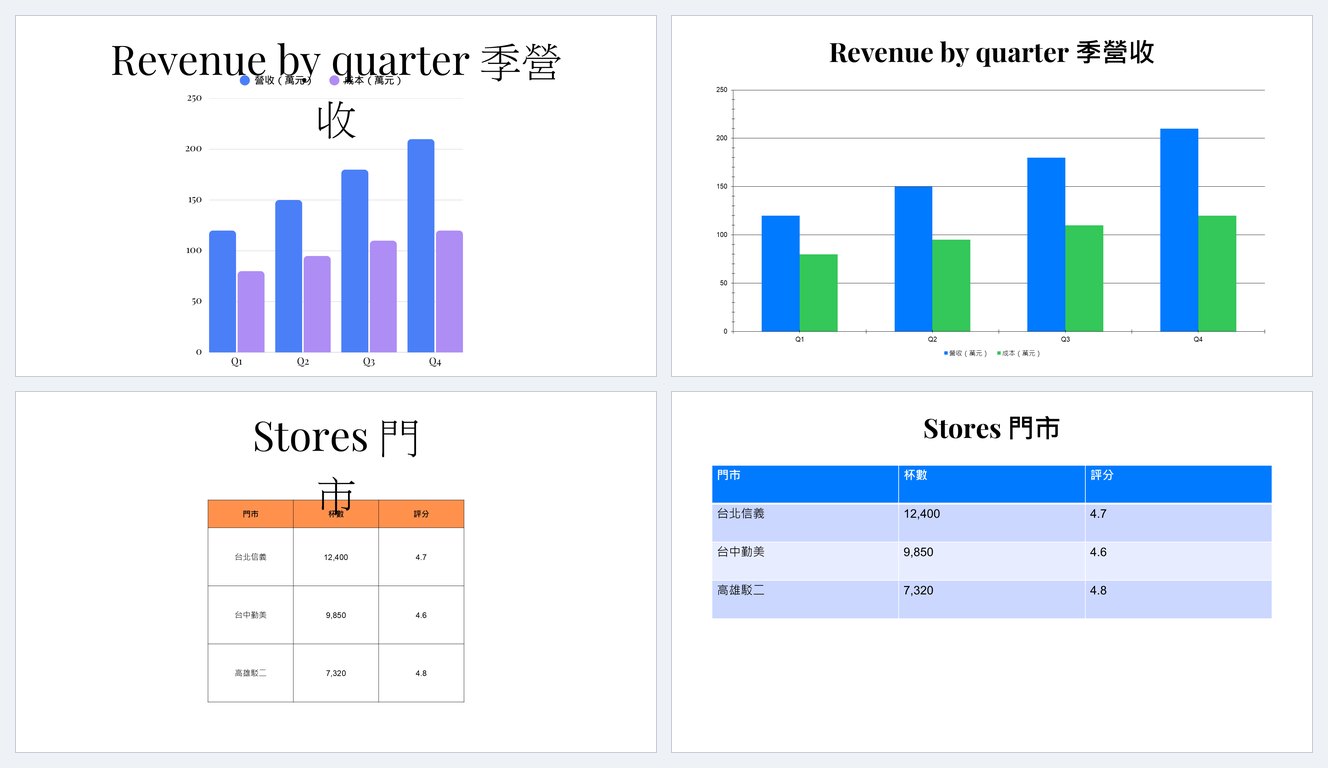
The Chinese text has a second gap: the fonts Canva puts in the file have no Chinese characters, so PowerPoint draws the Chinese with whatever font that computer has. Dock puts Noto Sans TC in the file.
Animations and the hidden slide
Before the download, Canva tells you that animations won’t play in this file type. It means it: the file has no animations at all. Transitions you add in Canva are kept, though Canva offers 10 kinds.
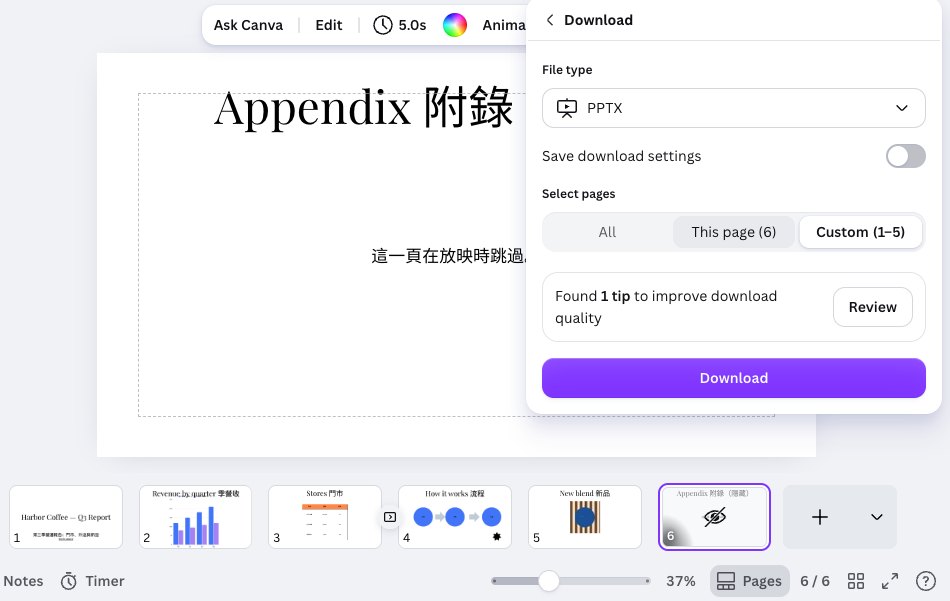
The hidden slide is easy to miss. When a deck has one, Canva’s download panel picks Custom (1–5) by default, so the file you get has five slides. The appendix you hid for the Q&A is simply not there. Choose All and it comes through, still hidden.
The round trip: a PPTX in, a PPTX out
This is the route most work takes: someone sends you a PowerPoint file, you change it, you send it back.
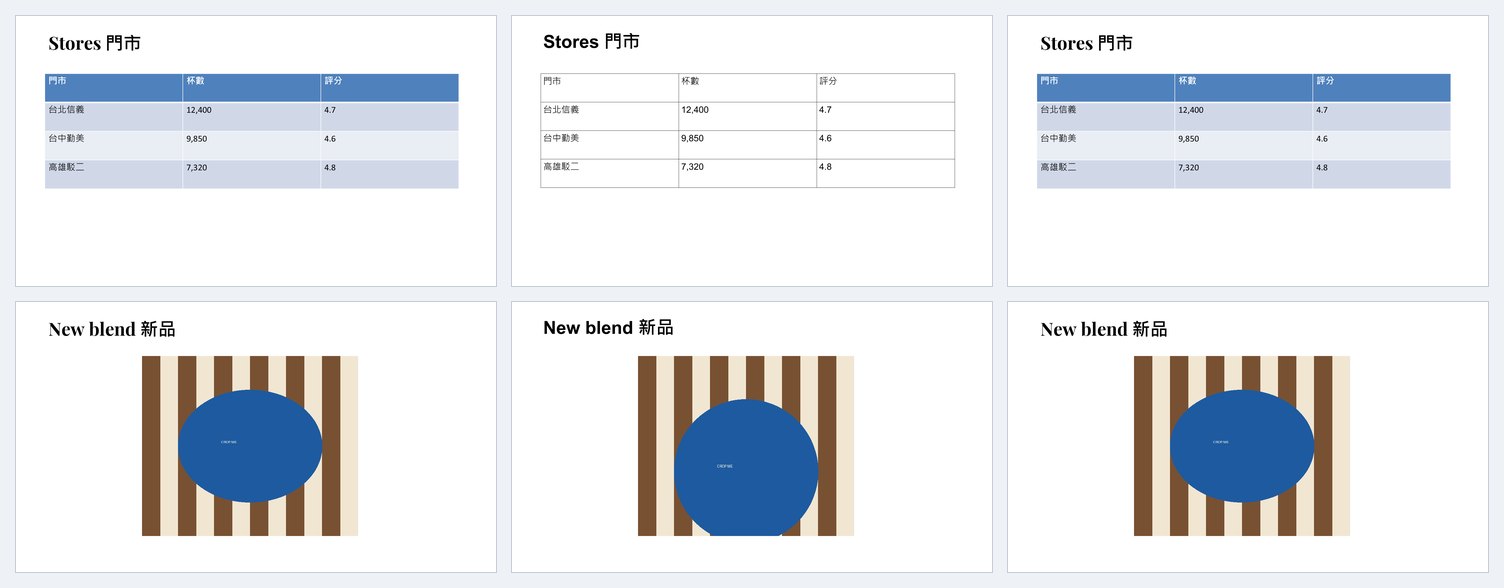
After Canva, the table lost its style, the cropped picture shows a different part of the image, the group was taken apart, the hidden slide was gone, the fade on slide 1 was gone and the push on slide 4 had become a fade. The chart became a picture here too. After Dock, all of these matched the original.
Where Canva did better, or the same
- The Latin title font. Canva’s file made in Canva carries Playfair Display. Dock’s file does not, nor Dock’s default Latin body font, Helvetica Neue, which Windows doesn’t have. One caveat: our PowerPoint was Microsoft 365, which downloads cloud fonts on its own, so we can’t tell which copy of Playfair it drew.
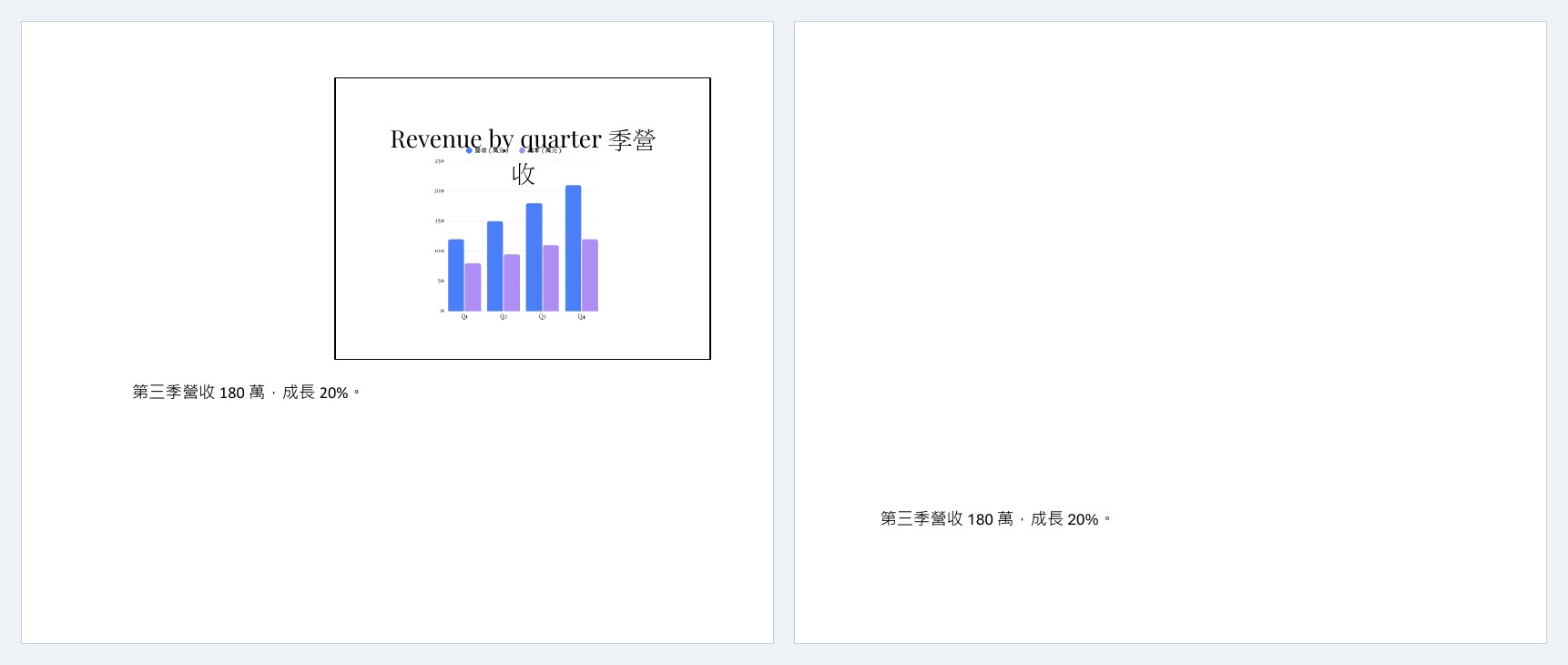
- The notes page. On a printed notes page, Canva’s slides 2–6 show the slide above the notes. In the deck made in Dock, those pages had only the notes text. The Dock round trip didn’t have this problem. We have filed it as a bug.
- File size. Canva: 284 KB made in Canva, 1.15 MB on the round trip. Dock: 9.66 MB and 9.72 MB. Almost all of Dock’s size is two weights of Noto Sans TC in the file, about 4.8 MB each.
- Export speed. Canva took 2.3–4.3 seconds to make the PPTX; Dock took 7.6–9.2 seconds.
- Transitions made in Canva were kept.
- The same in both: speaker notes text, hyperlinks, table contents and editing, and editing text.
Two small oddities in Canva’s file: the slide size is written as 1920×1080 pixels (20 × 11.25 inches) rather than PowerPoint’s usual 13.333 inches wide, and the date on the notes pages is a cached “1.7.2013” in a Czech date format.
What we did not test
- How the Playfair titles look on a computer without cloud fonts, in either file, and whether PowerPoint actually drew the Chinese text with the Noto Sans TC in Dock’s file.
- Animations and transitions playing in a slide show. We read the effect types from PowerPoint; we didn’t run the show.
- The Dock deck built by hand in the editor (an agent built it, as above).
- Canva’s plan tiers, and the Microsoft PowerPoint option in Canva’s Share menu.
When to use which
| Your situation | Better fit |
|---|---|
| A social post, a poster, a one-off visual, or a deck you present from Canva or share as a link | Canva |
| You need a small file to email, and nobody will edit it | Canva |
| The deliverable is a PPTX, and someone will open it in PowerPoint and change it | Dock |
| The chart numbers have to stay editable, or the deck has animations or a hidden appendix | Dock |
| The deck goes back and forth with people who use PowerPoint, so it is imported and exported again and again | Dock |
| The deck has Chinese text and has to look the same on someone else’s computer | Dock |
Canva is a design tool that can hand you a PowerPoint file. Dock edits the PowerPoint file itself, so the file you send is the one you worked on.
Frequently asked questions
Is Dock a Canva alternative for PowerPoint files?
For a deck that ends up as a PPTX someone edits in PowerPoint, yes: Dock edits the PowerPoint file itself, and the file you download is the one you worked on. For social posts, posters and one-off visuals, Canva is the better fit.
Does a chart made in Canva stay editable in PowerPoint?
No. In our test Canva's PPTX had the chart as a PNG picture, both made in Canva and on the round trip. Dock's file had a PowerPoint chart with its data, and changing a value in PowerPoint updated it.
Does Canva keep animations in a PPTX download?
No. Canva warns before the download, and the file had no animations at all. Transitions made in Canva were kept. Dock kept the entrance animation and both transitions.
Why is Dock's PPTX bigger than Canva's?
Almost all of it is the Chinese font. Dock puts two weights of Noto Sans TC in the file, about 4.8 MB each, so the text looks the same on another computer. Canva's file was 284 KB; Dock's was 9.66 MB.
Does Canva's PPTX download include hidden slides?
Not by default. When a deck has a hidden slide, Canva's download panel picks the other pages only; choose All and it comes through, still hidden. Dock keeps it as a hidden slide.
The Canva and Dock results in this post come from our own test on November 15, 2026, with PowerPoint for Windows 16.0.20527.20196 (Microsoft 365). Both products may change with updates.