
Pitch deck maker: fill a template from your notes
Dock's pitch deck maker fills a 12-slide pitch deck template from the notes you paste, and keeps its design.
Sign in to Dock and make a pitch deck from your notesSign in to Dock to start. See the pitch deck template first if you like.
A real example: a page of startup notes, made into a 12-slide pitch
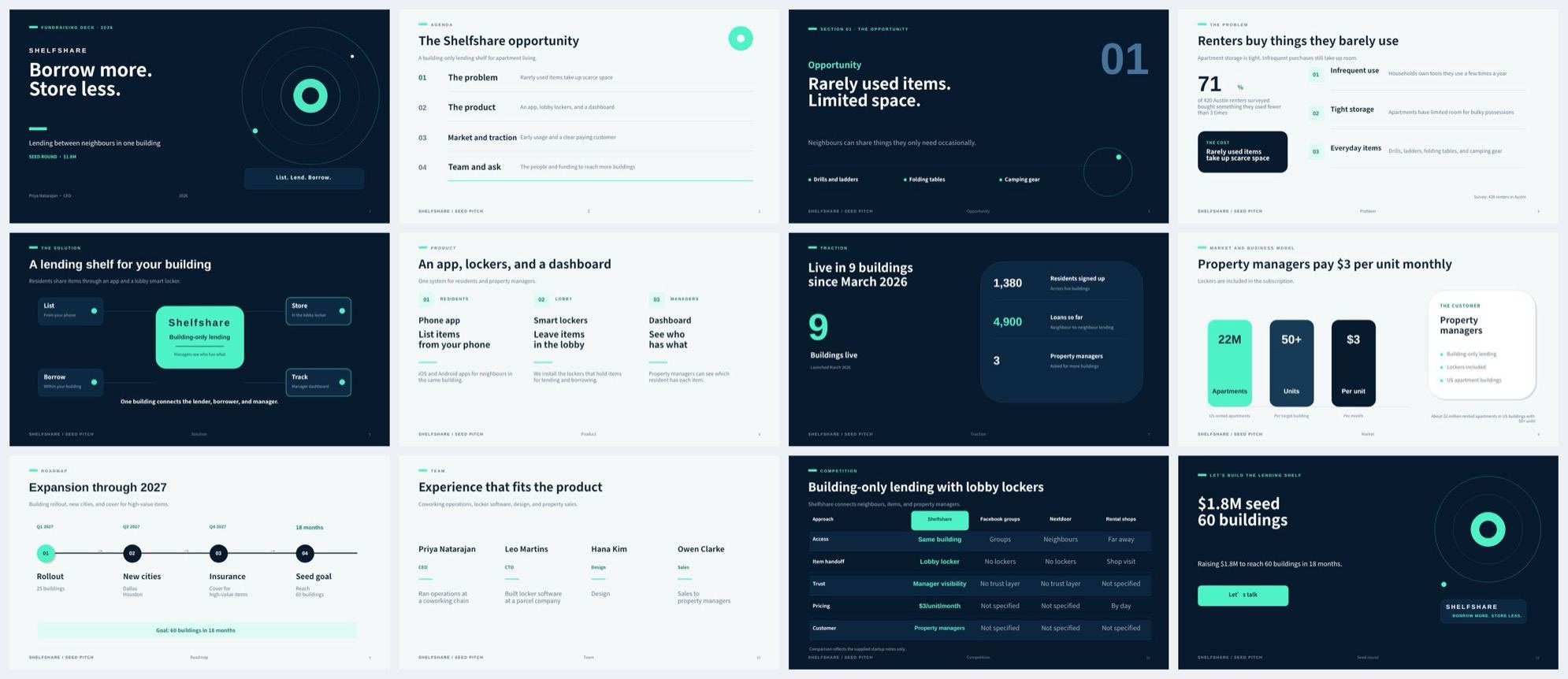
For founders with rough notes who need a first seed pitch, it works as an AI pitch deck generator that keeps the template's design. We started a deck from Dock's pitch deck template, opened Dock AI (the Agent in Dock) on it and pasted a page of notes for a made-up startup: the problem, traction, pricing, team and the ask. We read the plan and replied OK. You can download the notes and the finished deck. Result: 12 slides in the template's design, with speaker notes on every slide.

What the Agent did
- Before editing, it mapped our notes onto all 12 template slides, one by one, and waited for our OK.
- It kept the template's colours, type and layouts, and replaced every sample name, figure and contact line.
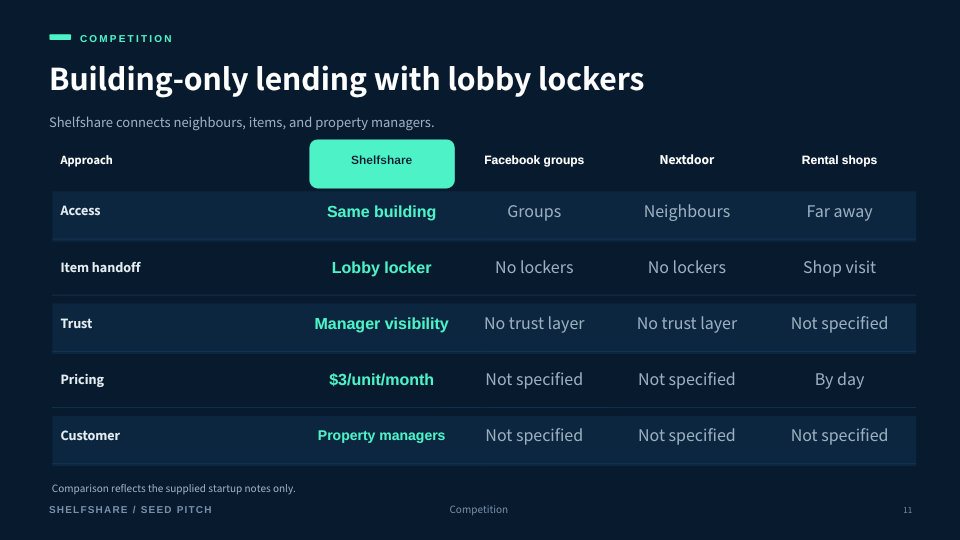
- Where the template's sample didn't fit our notes, it changed the slide. The market slide shows our market size and price, and the team slide shows names without photos.
- Every slide has speaker notes. They say the figures came from our notes.
What to check
- On slide 4 the % is its own text box; move it next to the 71.
- On slide 12 the button text is "Let’s talk" in the template's Chinese font, Source Han Sans TW, which draws the apostrophe wide, so Dock shows a gap. Switch that text to a Latin font. If PowerPoint doesn't have Source Han Sans, it uses another font.
- We ran it from the Dock AI panel in a deck made from the template, not from Home.
- We checked the slides in Dock and the contents of the downloaded file, not in PowerPoint itself.
- We ran this example on a test copy of Dock on 2026-11-23. If Dock gives you a different result, tell us through Help.
How to make a pitch deck from your notes
- 1
Pick the template
On the pitch deck template page, press Use this template and sign in.
- 2
Paste your notes
Paste what you have: the problem, the product, traction, pricing, team and the ask. Rough notes are fine.
- 3
Read the plan, then say OK
The Agent shows which part of your notes goes on which slide, and fills the deck after you say OK.
Before you send it to investors
Change only the slides you name
Ask the Agent to rework one slide, and it leaves the rest alone. If you don't like it, use Undo these changes.
Add your own photos
Put your team's photos and your product screenshots in yourself. The Agent doesn't invent them.
Send the file they want
Download PowerPoint, Keynote or PDF, or export to Google Slides. If your team builds and presents decks together online, read Pitch vs Dock first.
Frequently asked questions
How do I make a pitch deck with AI?
Start from Dock's pitch deck template, paste your startup notes and ask Dock AI to fill it in. It shows a plan for each slide first, fills the deck after you say OK, and you download it as PowerPoint, Keynote or PDF.
What slides should a startup pitch deck have?
Dock's template has 12. In our filled deck they were: cover, agenda, opportunity, problem, solution, product, traction, market, roadmap, team, competition and the ask.
Will the AI make up numbers for my pitch?
In our run it used only the figures in our notes. Where the template's sample needed data we didn't give, it changed the slide or wrote Not specified.
Can I edit the pitch deck in PowerPoint or Keynote?
Yes. Download it as a .pptx for PowerPoint or as Keynote. The text is editable in the file.
Bring your notes, keep the design
See the plan, say OK, then fix the details yourself.
Last updated