
Gamma vs Canva for presentations, tested in 2026
Gamma or Canva for presentations? In our Gamma vs Canva tests in November 2026, Gamma made the more complete deck from an outline and Canva made it faster. On a PowerPoint round trip, neither kept the file whole.
- From the same nine-slide outline on November 21, 2026, Gamma’s PowerPoint file had speaker notes on 9 of 9 slides and kept the table as a table. Canva’s file had no notes and turned the table into text boxes.
- Canva finished that deck in about 80 seconds. Gamma took under 4 minutes.
- Before a board could see them, Gamma’s decks had 1 thing to fix in English and 2 in Chinese. Canva’s had 2 and 4.
- When we imported a six-slide PowerPoint file and downloaded it again on November 20, both tools turned the chart into a picture and dropped the entrance animation. From a 369 KB original, Gamma’s file came back at 9.44 MB and Canva’s at 1.12 MB.
- In nine harder files the same day, neither tool kept a chart’s workbook, the company template, review comments or sections.
Gamma and Canva both build a deck in their own format, from a written prompt with AI if you like, and hand it to you as a PowerPoint file. That file is what we compared. Each result on this page comes from a test we ran and published, linked with its date. Gamma ran in a Pro workspace and Canva on a free account on November 20 and 21, so the two were not on matching plans; we say where that may matter. Plans and prices come from each company’s own pages, with the date we read them. Prices change, so check the linked page before you buy. We make Dock, another presentation tool, so we have a stake in this comparison; Dock’s own result is in a separate section near the end.
How we tested Gamma and Canva
| Test | Date | Gamma | Canva |
|---|---|---|---|
| A nine-slide outline made into a deck | November 21, 2026 | Pro workspace, home page prompt | Free account, Canva AI’s presentation prompt |
| A six-slide PowerPoint file, in and out | November 20, 2026 | Gamma 5, Pro workspace: Import, then Export | Free account: import, then download as PPTX with All pages |
| Nine files with harder PowerPoint features | November 20, 2026 | The same | The same |
| A deck made by Gamma’s generator | November 19, 2026 | Exported to PPTX | Not in this test |
| A deck made in Canva’s editor | November 15, 2026 | Not in this test | Downloaded as PPTX, plus a round trip, opened in PowerPoint for Windows |
We took every file apart. The November 19 to 21 files were drawn with Dock’s renderer; the November 15 Canva files were opened in PowerPoint for Windows.
From an outline: Gamma more complete, Canva faster
On November 21, 2026, we gave both tools one request: a nine-slide board deck for a made-up bike company, from a written outline, with a chart on slide 3, a table on slide 5 and speaker notes on every slide. We ran it once in English and once in Traditional Chinese, with no follow-up requests, and accepted Gamma’s proposed outline as it was. Both made all nine slides in the outline’s order, and neither changed or made up a number. The full prompt and scoring are in our five-tool comparison.
| What we checked | Gamma, Pro | Canva, free account |
|---|---|---|
| Slide 3, the chart, in the PowerPoint file | A picture of a chart | Shapes and text |
| Slide 5, the table, in the PowerPoint file | A table | Text boxes |
| Speaker notes in the file | 9 of 9 slides | None |
| Text running out of its box or overlapping, in the tool’s own editor | None | One Chinese slide |
| Font for the Chinese text, in the file | Noto Sans TC, three weights | Source Han Sans SC, the Simplified Chinese version, two weights |
| Time from the request to a finished deck | Under 4 minutes | About 80 seconds |
| Things to fix before a board sees it, English and Chinese | 1 and 2 | 2 and 4 |
| Credits used, English and Chinese | 85 and 107, or 2% and 3% of Pro’s monthly 4,000 | Not shown on the free account |
Canva’s editor showed a chart and a table, but the PowerPoint file held shapes and text boxes in their place. Canva AI said it had added speaker notes; the file had none. Its chat pane said “Sorry, that didn’t quite work” both times even though the deck was there, and the English download failed from the chat view and worked from the editor.
Gamma added photos to three or four slides. Its chart is a picture in the PowerPoint file, so changing a number there means rebuilding the chart.
The plans were not matched. Canva’s pricing page says its Free plan includes a tenth of Pro’s AI use (Canva pricing, read November 19, 2026). We did not run this test on Canva Pro, so we do not know whether Pro changes the notes, the chart or the table.
A PowerPoint file in and out: both lose the chart
On November 20, 2026, we imported the same six-slide PowerPoint file into both tools and downloaded it as PowerPoint again (PPTX export test). In Canva we chose All pages.
| In the file that came back | Gamma | Canva |
|---|---|---|
| Bar chart | A picture, redrawn in Gamma’s chart style | A picture, redrawn by Canva |
| Table | A table, its colours written into each cell | A table, without its header colour and banded rows |
| Fade on slide 1 | Dropped | Dropped |
| Push on slide 4 | Dropped | Turned into a fade |
| Entrance animation | Dropped, with no word in the export dialog | Dropped; Canva says so before the download |
| Group of shapes | Taken apart; the arrows and star became freeforms | The shapes became freeforms |
| Cropped picture | A new picture with the crop cut in | A freeform filled with the picture; the crop can’t be changed |
| Hidden slide 6 | Not in the file, which had 5 slides | In the file, no longer hidden |
| Speaker notes and the link | Kept | Kept |
| Font for the Chinese text | Noto Sans TC, in the file | Noto Sans, Noto Sans Bold or Playfair Display Bold, in the file; those copies held none of the deck’s Chinese characters |
| File size, from a 369 KB original | 9.44 MB | 1.12 MB |
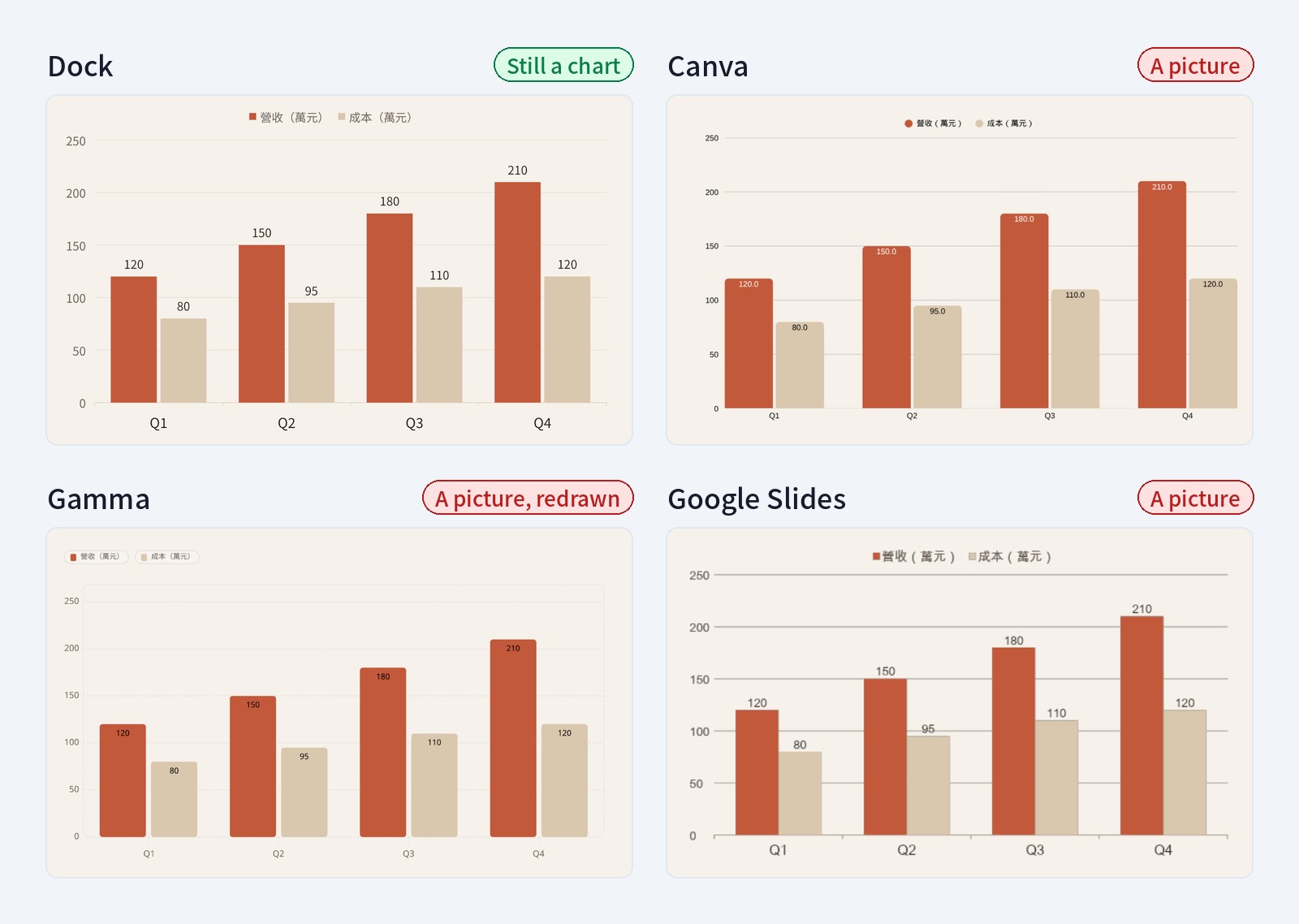
Neither file still had a chart with data behind it. Gamma’s help says imported charts can arrive as static images (Gamma help, read November 19, 2026). Most of Gamma’s 9.44 MB is the Noto Sans TC font. Canva named Noto Sans, Noto Sans Bold or Playfair Display Bold for the Chinese text and put copies in the file, but those copies held none of the deck’s Chinese characters, so a computer opening the file picks a Chinese font of its own. A slide you hid for the Q&A would play in Canva’s file and is gone from Gamma’s.
Nine harder PowerPoint features: neither kept one in full
The same day we ran nine more files through both tools, each holding one thing business decks rely on.
| Feature in the file | Gamma | Canva |
|---|---|---|
| Chart with its workbook | A picture, no workbook | A picture, no workbook |
| Company template | One layout, DEFAULT, on an empty master, no placeholders | Every slide on Blank, no placeholders or slide numbers |
| SmartArt | 12 shapes and 3 pictures | 15 freeforms and text boxes |
| Video with a trim, a fade and 2 bookmarks | A still picture | Video and trim kept; fade and bookmarks lost |
| Review comments and sections | Gone | Gone |
| Sensitivity label | Gone; its marking became text on every slide | Gone; its marking became text on every slide |
| Morph transition | No transition | Turned into a fade |
Macros in a .pptm |
Upload refused | Upload refused |
Canva came closer on two: its file still held the video with its trim, and it put a fade where Morph was, so the slide still has a transition. Gamma’s files were 14.5 to 15.2 MB, from inputs of about 90 KB.
Decks made in Gamma and Canva, then exported to PowerPoint
Gamma, November 19 (Gamma vs Dock). From a short outline, Gamma’s generator wrote six cards with a bar chart, a table, a link and two AI pictures. In the PowerPoint export the chart was a picture, and a card we had hidden was left out even with All slides selected. The export dialog warned that PowerPoint does not support some effects, such as gradient text and frosted backgrounds, named the fonts to install, and warned that one card ran past the slide edge. It said nothing about charts, transitions or the hidden card.
Canva, November 15 (Canva vs Dock). The chart is live in Canva’s editor and a PNG picture in the PPTX. When a deck has a hidden slide, the download panel picks the other pages by default; choose All and the slide comes through, still hidden. The push transition made in Canva was kept, and the animation was dropped, as Canva warns. Opened in PowerPoint for Windows, the titles on slides 2 to 6 wrapped onto a second line, and on slide 3 the second line sat on the table. The fonts in the file had none of the 24 Chinese characters we checked. The file was 284 KB, and Canva made it in 2.3 to 4.3 seconds.
Plans, prices and agents, as we read them
From each company’s pages, read on November 19, 2026, unless noted:
- Gamma lists Plus at US$12, Pro at US$25 and Ultra at US$100 a month, paying monthly, with up to 28% off for yearly billing (Gamma pricing). Pro gives 4,000 credits a month (Gamma help, read November 21, 2026).
- Gamma Free gives 400 credits at sign-up that do not refresh and 10 cards a prompt, and its PDF and PPTX exports carry a “Made by Gamma” badge (Gamma pricing, export help). Our Pro files had no badge.
- Canva’s pricing page, served to us in its Taiwan version, lists Pro at NT$3,600 a year for one person and Business at NT$6,300 a year a person, and says Free includes a tenth of Pro’s AI use (Canva pricing). The currencies and billing periods differ, so we do not rank the two on price.
- Both have an official MCP server on every plan. MCP (Model Context Protocol) is how an AI app such as Claude or ChatGPT uses another product’s tools. Gamma also has an API and connectors in ChatGPT and Claude (Gamma MCP docs). Canva keeps brand kits and brand templates in its MCP server for Pro and up (Canva MCP docs).
- Gamma shares by view, comment and edit links, with analytics from Pro (Gamma help). It imports PowerPoint, POTX, Word, PDF, Excel, CSV and web pages (Gamma help) and exports PDF, PNG, PPTX and Google Slides (export help).
- Canva exports PDF, PNG, PPTX, MP4 and more (Canva MCP docs).
Gamma or Canva: which to pick
| Pick Gamma when | Pick Canva when |
|---|---|
| You want a draft from an outline whose PowerPoint file keeps speaker notes and the table. Gamma’s had both; Canva’s had neither (November 21). | You want the draft fast. Canva finished in about 80 seconds, Gamma in under 4 minutes (November 21). |
| You want fewer fixes before the deck goes out: 1 and 2 for Gamma against 2 and 4 for Canva, in English and Chinese (November 21). | You are on a free plan. Canva’s free account made all nine slides (November 21). We did not test Gamma Free. |
| You want photos added for you. Gamma put them on three or four slides (November 21). | The deck sits next to social posts, posters and videos you make in Canva, and may go out as MP4 (Canva MCP docs, read November 19). |
| You present from a link, with cards longer than a slide, and want to see views: analytics come with Pro (Gamma help, read November 19). | The team shares brand kits and brand templates, which Canva has for Pro and up (Canva MCP docs, read November 19). |
| You start from Word, Excel, CSV, PDF or a web page, or need a Google Slides copy (Gamma help, read November 19). | The deck has a trimmed video that has to stay a video in the PowerPoint file. Canva kept it; Gamma wrote a still picture (November 20). Canva warns videos won’t play in a PPTX, and we did not check playback in PowerPoint. |
| The text is Traditional Chinese. Gamma’s files carried Noto Sans TC on November 20 and 21, though a deck Gamma made on November 19 named Inter Bold, which has no Chinese characters. | A deck made in Canva has a hidden appendix. With All pages chosen, Canva kept it hidden (November 15); on an imported PowerPoint file it came back no longer hidden (November 20). Gamma left a hidden card out even with All slides selected (November 19). |
| Your agent works in ChatGPT or Claude: Gamma has connectors there, plus an MCP server and an API on every plan (Gamma MCP docs, read November 19). | You need a small file to email: 1.12 MB against Gamma’s 9.44 MB from the same 369 KB deck (November 20). |
What we could not check
- Gamma’s Free plan, including whether its PPTX export carries the badge in practice. That needs a Gamma Free account; our tests used Pro.
- Canva Pro or Business: the outline test with Pro’s larger AI allowance, brand kits and brand templates, and whether credit use shows. That needs a Canva Pro account; our tests used a free account.
- Opening Gamma’s files in PowerPoint, and Canva’s files from November 20 and 21. Only the November 15 Canva files were opened in PowerPoint.
- Gamma’s analytics and Edit with Agent, and editing a Canva design through its MCP server. We read about them; we did not use them.
- Canva’s sharing and presenting features. Its help pages did not load from our test machine on November 19, so this page says nothing about them.
- Canva’s US prices. Its pricing page served Taiwan prices to the browser that read it.
When neither fits: a PowerPoint file someone keeps editing
Both tools make the deck in their own format and hand you PowerPoint as an export. That suits a deck you present and move on from. It wears down a .pptx that a client, finance or your manager keeps opening and changing in PowerPoint: in our tests, both tools turned the chart in the six-slide deck into a picture. With the company-template file, Gamma left one layout, DEFAULT, on an empty master, and Canva put every slide on Blank. The comments file lost its review comments in both, and the sections file its sections. For that job, see 4 Gamma alternatives for PowerPoint, tested and 4 Canva alternatives for presentations, tested.
We make Dock, which edits the PowerPoint file itself. On November 24, 2026, we sent the same ten files, the six-slide deck and the nine harder files, through Dock’s test service, uploading and downloading each with no edits. Six came back byte for byte as they went in: the company template, SmartArt, sections, the sensitivity label, Morph and the .pptm with its macros. In the other four, the chart kept its workbook and values; the transitions, animation and hidden slide stayed; the video kept its trim, fade and bookmarks; and the review comments kept their authors, threads, replies and resolved status. Dock dropped the thumbnail picture from those four files, and in the comments file it removed the comment pin positions and the Traditional Chinese language tags.
Frequently asked questions
Should I use Gamma or Canva for presentations?
For a draft from an outline with speaker notes and a table in the PowerPoint file, Gamma: in our November 21, 2026 test its file had both and Canva's had neither, and it needed fewer fixes. For speed, Canva: about 80 seconds against under 4 minutes. For a deck that sits with social posts, posters and video, Canva.
Do Gamma and Canva keep charts editable in PowerPoint?
Not in our tests. Gamma's PowerPoint files held a picture of the chart on November 19, 20 and 21. Canva's held a picture on November 15 and 20, and shapes and text on November 21. In Canva's editor the chart is live until you download it.
Do Gamma and Canva keep animations and transitions in a PPTX?
Neither kept the entrance animation in our November 20 round trip. Canva dropped the fade and turned the push into a fade; Gamma dropped both. A push transition made in Canva was kept on November 15. Canva warns about animations before the download; Gamma's export dialog did not mention them.
Do Gamma and Canva keep hidden slides?
Canva's default download leaves a hidden slide out; choose All pages and it comes through, still hidden (November 15). After a round trip, Canva's file kept the slide but no longer hidden (November 20). Gamma left a hidden card out even with All slides selected (November 19), and its round trip came back with five of six slides (November 20).
How do Gamma and Canva handle Traditional Chinese slides?
In our November 21, 2026 outline test, Gamma's PowerPoint file carried Noto Sans TC in three weights. Canva's carried Source Han Sans SC, the Simplified Chinese version, in two weights, and in Canva's editor the text ran out of its box or overlapped on one Chinese slide. On November 15 the fonts in Canva's file had none of the 24 Chinese characters we checked, and on November 20 its file named Noto Sans, Noto Sans Bold or Playfair Display Bold for the Chinese text and carried copies of them, but those copies held none of the deck's Chinese characters. A deck Gamma made on November 19 named Inter Bold, which has no Chinese characters.
Which costs less, Gamma or Canva?
We did not rank them. Gamma lists Plus at US$12 and Pro at US$25 a month, paying monthly. Canva's pricing page, read in its Taiwan version, lists Pro at NT$3,600 a year for one person. We read both on November 19, 2026. Both have free plans; Gamma's puts a "Made by Gamma" badge on PDF and PPTX exports, its help page says.
Related
- Canva vs Dock: which PPTX can you keep editing?
- Gamma vs Dock: what is left in the PPTX
- Dock vs Canva vs Gamma vs Google Slides vs Copilot
- PPTX export test: Dock, Canva, Gamma, Google Slides
The Gamma and Canva results come from our own tests: Canva on November 15, 2026, with files opened in PowerPoint for Windows (Microsoft 365); Gamma’s generator on November 19; both tools’ PowerPoint round trips on November 20 (Gamma 5 in a Pro workspace, Canva on a free account); and the outline test on November 21 (Gamma Pro, Canva free). Dock’s result is from Dock’s test service on November 24, 2026. We read Gamma’s and Canva’s pages on November 19, 2026, and Gamma’s plan help page on November 21. Both products may change with updates.