
Best AI presentation makers in 2026, tested
The best AI presentation maker depends on where the deck goes after the first draft. In our November 2026 tests, Dock was best for a PowerPoint file you keep editing, Gamma for a web deck with photos, and Canva for the fastest draft, at about 80 seconds a deck. Claude Slides suits a quick deck you present inside Claude. To make slides from a file you already have, start with Dock’s AI presentation maker.
An AI slide generator turns a written request into a first draft of a deck. Making those AI slides was the easy part: Dock, Gamma and Canva each turned the same outline into nine slides in under 4 minutes. They differed in what the PowerPoint file held: whether the chart still had its numbers, whether the speaker notes came with it, and how much we had to fix before a board could see it.
We make Dock (dock.space), GNTC’s AI presentation editor for PowerPoint, Keynote and PDF, so keep that in mind as you read. Each result below comes from a test we ran, with its date. Where we have not tested something, we say so.
The best AI presentation maker for each job
| If you need | Pick | What our tests showed |
|---|---|---|
| A PowerPoint file you or a client will keep editing | Dock | The only PowerPoint file with a chart that still held its numbers. A table on slide 5 and speaker notes on all nine |
| A deck with photos to present from the web | Gamma | Nine of nine cards, photos on three or four of them, one thing to fix in English |
| The fastest first draft | Canva | About 80 seconds a deck |
| A quick deck while you already work in Claude | Claude Slides | Made and presented inside Claude. Its PowerPoint export lost the chart’s data, the transition and the appendix |
How we tested
On November 21, 2026, we gave Dock, Gamma and Canva the same request. It asked for a nine-slide board deck from a written outline about a made-up bike company, with a chart on slide 3, a table on slide 5 and speaker notes on every slide. We ran it once in English and once in Traditional Chinese, as one message each, with no follow-ups. We wrote down how we would score the decks before the first run. Then we exported each deck to PowerPoint and read what each file held.
- Dock ran in a Plus workspace on Dock’s test service, at its Quick level, which builds the whole deck in one go.
- Gamma ran in a Pro workspace on the web, with its defaults. We accepted the outline Gamma proposed as it was.
- Canva ran on a free account, with Canva AI’s presentation prompt.
The prompt, and slides 3 and 5 from each tool, are in our five-tool comparison. A script sent Dock the same request its home page box sends at Quick.
Claude Slides had a separate test, on November 14, 2026, in Claude Desktop for Mac. We asked for a five-slide quarterly report for a coffee shop with a bar chart, a table with a merged header, speaker notes, a transition and an appendix to skip when presenting. That is a different request, so Claude Slides has its own section below and is not in the table.
Results side by side
| What we checked | Dock, Plus, Quick | Gamma, Pro | Canva, free account |
|---|---|---|---|
| Slides, in the outline’s order | 9 of 9 | 9 of 9 | 9 of 9 |
| Numbers changed or made up | None | None | None |
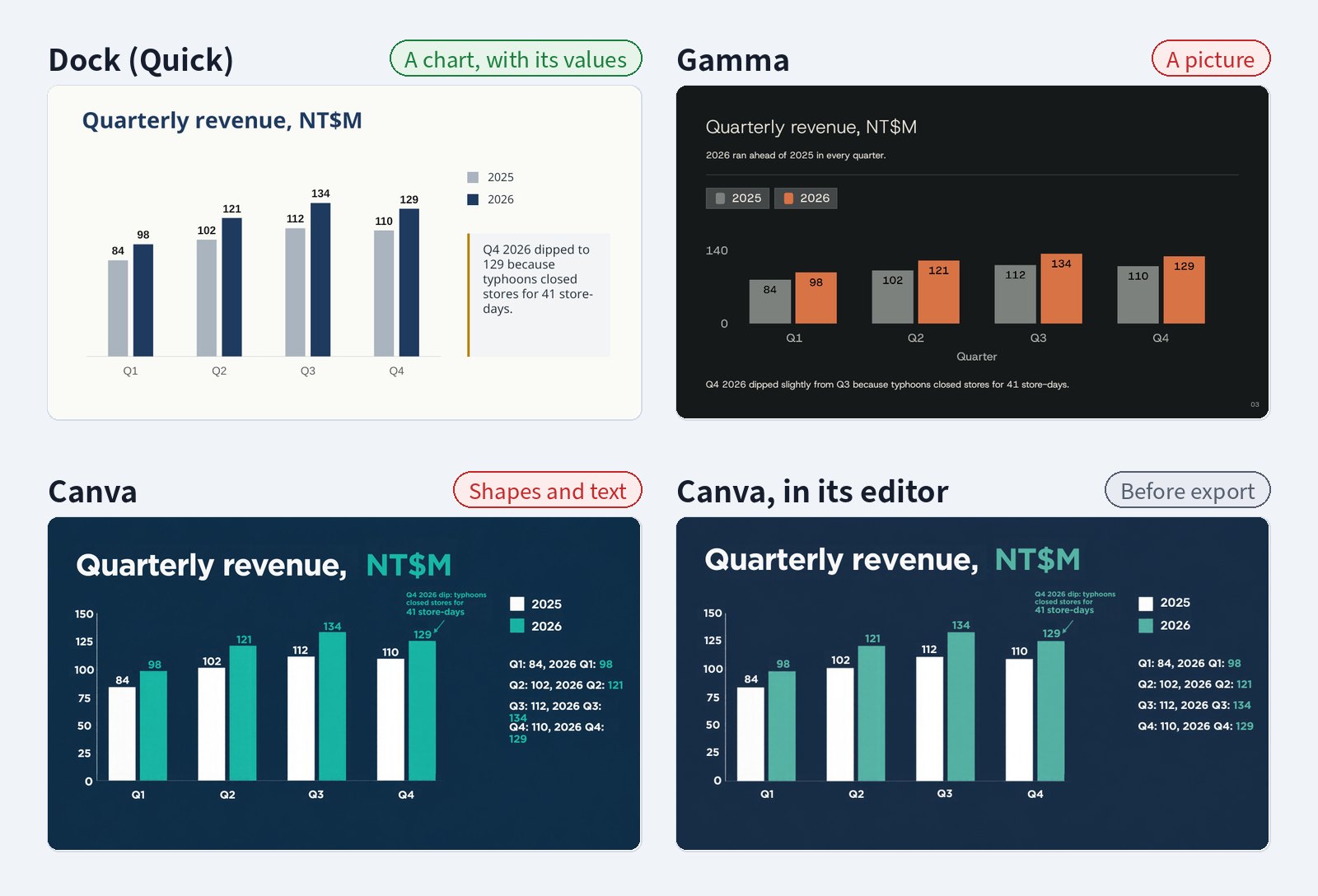
| Slide 3 in the PowerPoint file | A PowerPoint chart with the 8 values | A picture of a chart | Shapes and text |
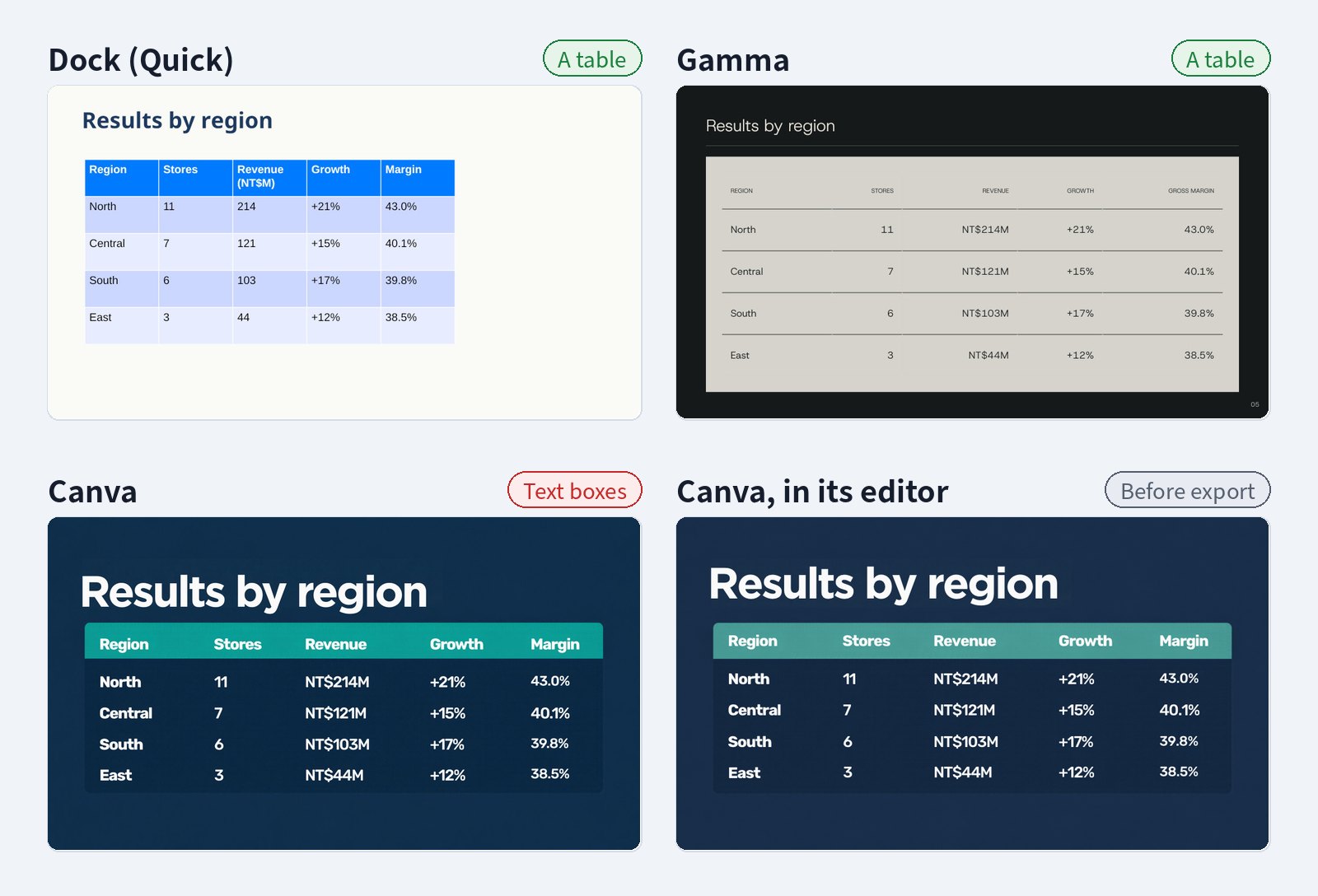
| Slide 5 in the PowerPoint file | A table | A table | Text boxes |
| Speaker notes | 9 of 9 | 9 of 9 | None |
| Time from the request to a finished deck | About 2 minutes | Under 4 minutes | Under 1.5 minutes |
| Things to fix before a board sees it, English and Chinese | 3 and 1 | 1 and 2 | 2 and 4 |
| Share of the plan’s monthly credits, per run | About 3% of Plus’s 2,000 per member | 2% to 3% of Pro’s 4,000 | Not shown on this account |
The best AI presentation makers, ranked
We ranked by what matters when the deck has to go on after the first draft: to a colleague in PowerPoint, to a client, or back to you next quarter. If you only need slides on screen fast, Canva was the quickest.
1. Dock: best when the deck has to stay a PowerPoint file
In our November 21, 2026 outline test, Dock’s PowerPoint file was the only one of the three whose chart still held its numbers. Slide 3 was a PowerPoint chart with the eight quarterly values, and slide 5 was a table. Every slide had speaker notes. We opened the file from our first Dock run in desktop PowerPoint for Windows, and Edit Data on the chart opened an Excel sheet with the numbers. The Quick file stores its chart the same way; we did not open it in PowerPoint.
The deck took about 2 minutes. Each run used about 3% of the 2,000 credits a Plus member gets each month.
What to fix:
- On two English slides, the big numbers NT$482M and NT$560M ran past the edge of their boxes.
- The English cover left out the words “Board meeting”.
- In the Chinese table, the closing bracket of one heading wrapped onto its own line.
Both tables also used a plain blue style that does not match the rest of the deck.
When we tested, the Free plan made up to 5 slides a run. The same request on Free stopped at 5 of the 9 slides, and Dock said which items it had left out. Each Free run used 56 to 72 of the 400 credits a Free account gets once. Free now makes up to 100 slides a run, like every plan (pricing).
Our first Dock run used the Standard level, which shows a plan before it builds. That deck needed no fixes and had extra charts, but it took about 5 and 7 minutes, and used 18% and 36% of Plus’s monthly credits. Dock’s prompt box offers three levels: Quick, Standard and Polished.
After the draft, the deck is the .pptx itself, and you and your own agent edit that same file. In our PPTX export test, Dock’s file kept the chart, the transitions, the animation and the hidden slide.
Price: Free gives 400 AI credits once. Plus is US$12 a member a month with 2,000 credits, and Business is US$24 with 6,500 (pricing).
2. Gamma: best for a web deck with photos
In the same test, Gamma made all nine cards and put photos on three or four of them. Slide 5 stayed a table in the PowerPoint file, and every slide had speaker notes. It needed one fix in English and two in Chinese, the fewest in English of the three. A deck took under 4 minutes, and each run used 2% to 3% of the 4,000 credits Gamma Pro gives each month.
What to watch: in the PowerPoint file, the chart on slide 3 is a picture, so changing a number means changing it in Gamma and exporting again. In our export test, Gamma’s PowerPoint file also dropped the transitions and the animation and left the hidden slide out.
3. Canva: the fastest first draft
In the same test, Canva AI made each deck in about 80 seconds, the fastest of the three, with all nine slides in order, and its editor showed a chart on slide 3 and a table on slide 5.
What to watch:
- In the PowerPoint file, the chart was shapes and text, and the table was separate text boxes.
- The file had no speaker notes, although Canva AI said it had added them.
- Both times, the chat pane said “Sorry, that didn’t quite work”, though the deck was there.
- The English download failed from the chat view and worked from the editor.
- The Chinese text was set in Source Han Sans SC, the Simplified Chinese version of the font.
It needed two fixes in English and four in Chinese. For a deck made in Canva’s editor and downloaded as PowerPoint, see Canva vs Dock.
4. Claude Slides: a quick deck inside Claude
In our November 14, 2026 test, Claude made the five-slide report from one request, and you can present the deck in Claude. In the PowerPoint file we exported, the numbered list, the speaker notes and the fonts came through.
What to watch, in that PowerPoint file:
- The bar chart was 12 rectangles and a line, with no chart object, so there were no numbers to change.
- The circles, icons and arrows became 8 pictures.
- The transition was gone, and so was the appendix we had asked to skip: the file had 4 slides.
- The colours were fixed values, with no theme colours.
The details are in Claude Slides vs Dock.
Which is the best AI presentation maker for you?
| Your situation | Pick |
|---|---|
| The deck goes to people who edit it in PowerPoint, and its charts must stay charts | Dock |
| You want a first draft with speaker notes on every slide | Dock or Gamma |
| You present from a link and want photos in the draft | Gamma |
| You need something on screen in under two minutes | Canva |
| You already work in Claude and will present from there | Claude Slides |
| You want an agent such as Claude Code or Codex to build and edit the PowerPoint file itself | Dock (how to connect one). Gamma’s and Canva’s MCP servers make their own designs, which you export |
| You want to try for free | Canva AI made all nine slides on a free account. Dock Free makes up to 100 slides a run, with 400 AI credits once and 3 exports a month (pricing) |
What we did not test
- Copilot in PowerPoint: we have no Copilot seat.
- Google Slides with Gemini.
- Gamma’s Free plan, and Canva’s paid plans.
- Opening Dock’s Quick file, Gamma’s and Canva’s files in PowerPoint. Those rows are read from the files.
- Typing into Dock’s home page box. A script sent the request the box sends at Quick.
- Other AI slide tools. If a tool is not on this page, we have not tested it yet, so we have not ranked it.
Frequently asked questions
What is the best AI presentation maker in 2026?
It depends on what happens after the first draft. In our November 2026 tests, Dock was best for a PowerPoint file you keep editing: its file was the only one with a chart that still held its numbers. Gamma was best for a deck with photos presented from the web, and Canva was the fastest at about 80 seconds a deck.
Which AI PPT maker gives you an editable chart in PowerPoint?
In our test, only Dock. From the same outline, Dock's PowerPoint file had a chart with the eight values, Gamma's had a picture of a chart and Canva's had shapes and text. Claude Slides, in a separate test, exported its chart as 12 rectangles and a line.
Which AI presentation makers keep speaker notes in the PowerPoint file?
In our November 21, 2026 outline test, Dock and Gamma put speaker notes on all nine slides. Canva's file had none, although Canva AI said it had added them. In a separate test on November 14, 2026, Claude Slides kept its speaker notes in the PowerPoint export.
Which AI presentation maker is the fastest?
Canva, at about 80 seconds a deck. Dock took about 2 minutes at its Quick level and Gamma under 4 minutes. Canva's file had no speaker notes, and its chart and table were shapes and text boxes in PowerPoint.
Is there a free AI presentation maker?
Canva AI made all nine slides on a free account in our test. Dock's Free plan gives 400 AI credits once, makes up to 100 slides a run and includes 3 exports a month (pricing). When we tested, Free stopped our nine-slide request at 5 slides, the per-run cap it had then. We did not test Gamma's Free plan.
Did the AI tools change the numbers in the outline?
No. Dock, Gamma and Canva all kept the outline's order and used its numbers as given, in English and in Traditional Chinese.
Can an AI agent build the PowerPoint file for me?
With Dock, yes: an agent such as Claude Code or Codex can build and edit the PowerPoint file itself through Dock's MCP server or command line, on every plan. Gamma's and Canva's MCP servers make their own designs, which you then export.
How did you test the best AI presentation makers?
On November 21, 2026, we gave Dock, Gamma and Canva the same request: a nine-slide board deck from a written outline, with a chart on slide 3, a table on slide 5 and speaker notes on every slide, once in English and once in Traditional Chinese. We set the scoring rules before the first run, exported each deck to PowerPoint and read what each file held. Claude Slides was tested on its own, on November 14, 2026, with a five-slide report.
Related
- Dock vs Canva vs Gamma vs Google Slides vs Copilot: the full outline test, with prices and features
- PPTX export test: Dock, Canva, Gamma, Google Slides
- 4 Gamma alternatives for PowerPoint, tested
- 4 Canva alternatives for presentations, tested
The outline test ran on November 21, 2026: Dock on its test service in a Plus workspace at the Quick level, Gamma on the web in a Pro workspace, Canva on the web with a free account. Dock’s first run, at the Standard level, was earlier the same day; we opened that file in desktop PowerPoint for Windows with Microsoft 365. Claude Slides was tested on November 14, 2026, in Claude Desktop for Mac. Gamma Pro’s monthly credits come from its upgrade help page, read on November 21. Tools change; these are the results on those days.