
Claude Slides vs Dock: lossy export, lossless edits
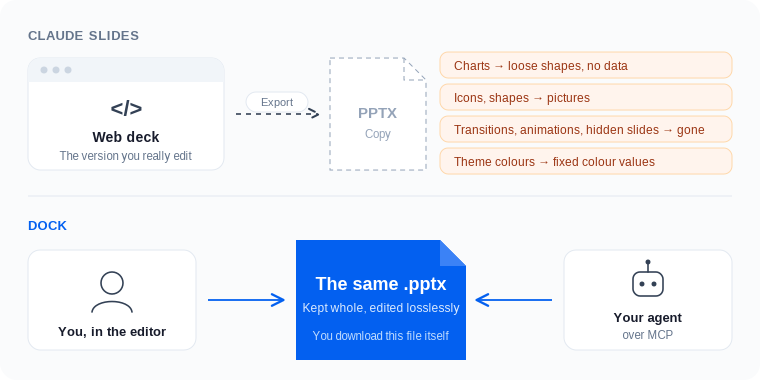
Claude Slides and Dock can both have AI make a deck from one sentence. The difference between them is not the AI. It is where the deck file itself lives.
- Claude Slides: the deck is an artifact in Claude. You edit it in Claude and present it in Claude. To give someone a PowerPoint file, you export one from Claude.
- Dock: the deck is the
.pptx. People and agents both change that file, and what you download is the same file, not a converted copy.
You can’t see this difference on the first draft. It shows on the second and third, or when the deck goes back to a client who uses PowerPoint.
How Claude Slides makes a deck
Anthropic’s own Claude Academy tutorial says that in a PowerPoint export “Charts, icons and shapes become pictures” and “Slide transitions and skipped slides are left out.” We wanted to know what that looks like in practice, so we tested it ourselves.
How we tested: on November 14, 2026, in Claude Desktop for Mac (5.11492.5, Opus 5.5), we asked Claude Slides for a five-slide quarterly report for a coffee shop. We deliberately asked for a native bar chart, a numbered list, a table with a merged header, speaker notes, circles with icons and arrows, a transition on one slide, and an appendix slide to skip when presenting. Then we exported it as “PowerPoint, current fonts” and as “Web page (.html)”, and took both files apart.
First, what it starts as. In the web page export, each slide is a 1920×1080 HTML block laid out with CSS flexbox, and the icons are inline SVG. The transition is written in the page’s settings ("transition":"fade"). When you export to PowerPoint, the prompt that appears is “Let this artifact download a file?”: the PPTX is a file the web deck converts itself into.
Then, what it looks like as a PPTX:
| What we asked for | In Claude Slides | In the exported PPTX |
|---|---|---|
| Native bar chart | Claude draws the bars with shapes | 12 rectangles and 1 line, no chart object. You can drag a bar, but you can’t change the numbers |
| Table with a merged header | The table is laid out with divs; “Revenue ($K)” is a separate text box | No merged cells at all in the table; the header is a separate text box on top of it |
| Circles, icons, arrows | SVG and CSS shapes | 8 PNG images |
| Transition (fade) | Yes, in the web export too | None |
| Icons appearing one by one | Yes | None |
| Appendix slide skipped when presenting | In the editor | The whole slide is gone, leaving 4 slides (the web export too) |
| Colours | Coffee browns | All written as fixed colour values, not one of them a theme colour |
| Numbered list | Yes | Kept, as PowerPoint automatic numbering |
| Speaker notes | Yes | Kept |
| Fonts | Fraunces, Inter | Embedded in the file |
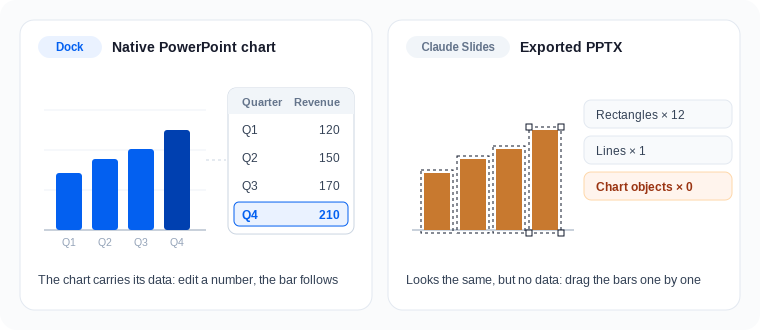
To be fair, the text, numbering, speaker notes, table contents and fonts come through well, and you can present the file as soon as you open it. But everything in PowerPoint that has structure (the chart’s data, merged cells, transitions, animations, hidden slides, theme colours) became a picture, a fixed value, or disappeared somewhere along this conversion.
This route has real advantages: web layout is very flexible, generation is fast, and presenting in Claude works very well. The cost is that the PowerPoint file is the end point, not the place where the work happens.
How Dock makes a deck
Dock is a native PowerPoint file editor. The deck is the .pptx file itself. There is no other, “real” version hidden behind it.
- It edits the file; it doesn’t regenerate it. When an agent says “shorten the title on slide 3”, Dock changes only that text box on that slide and leaves everything else alone.
- Our own renderer and editing engine. We don’t borrow PowerPoint, and we don’t turn the deck into a web page first and draw that. We read PowerPoint files ourselves and draw every slide ourselves. The engine runs as WebAssembly right in your browser. Part of the core engine is built in Rust.
- People and agents change the same file. What you press in the editor and what an agent calls are the same set of editing actions, on the same file.
- It doesn’t drop what it doesn’t understand. Macros, media files and embedded fonts, along with content such as equations, ink, 3-D models and newer chart types, are still there after you open the file and save it again.
Why we call it “the long tail”
A real-world PowerPoint file is more than slides of text and pictures. It has a lot of structure you can’t see. Nobody notices it until it breaks, and then everyone does. These are some of the items Dock handles one by one:
Layout and master inheritance
Fonts, sizes and positions inherit all the way down from the master. Regenerating turns them into hard-coded values that don’t follow a new template.
Text autofit
When there’s too much text, PowerPoint shrinks it automatically. Converters often turn that into a fixed size, and the text runs out of its box.
Theme colours and shades
“Accent 1, Lighter 40%” often becomes a fixed colour value after conversion, and no longer changes with the theme.
Automatic numbering
Numbering is formatting, not text. After conversion it often becomes a typed-in “1.” and “2.”, and inserting a line breaks the order.
Merged table cells
Lose the merge and the header turns into a row of small cells, or into another text box sitting on top of the table.
Native charts
A chart is a chart object that carries its data. Once it is turned into a picture or shapes, you can’t change its numbers directly.
SmartArt
It is a set of data plus layout rules, not a few loose shapes. Change one item and the whole graphic lays itself out again.
Sections and custom shows
Big decks are organised with sections, and one file can run in a different order for different audiences.
Speaker notes
What the presenter actually reads has to travel with each slide.
Transitions and animations
Timelines, triggers and sounds are all stored in the file, and still play when PowerPoint opens it.
Equations
Stored in an editable math format, with a fallback picture beside it. Turned into a picture, it can never be edited again.
Embedded fonts and macros
A client’s brand font and the company’s own automation must not quietly disappear.
There is no shortcut to getting this far. Each item has to be built and checked, one at a time.
Animation and preview
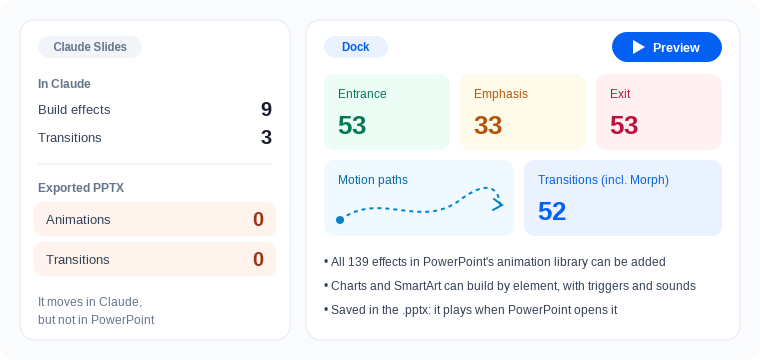
Animation is what a conversion loses most easily. The deck we tested had a transition and icons that appeared one by one in Claude; after the PPTX export, animations and transitions were both 0. Taking the web version apart shows that the Claude Slides player has only 9 build effects and 3 transitions.
Dock uses PowerPoint’s own animations: all 139 effects in the animation library, across entrance, emphasis and exit, can be added, plus motion paths. There are 52 transitions, including Morph. Charts and SmartArt can build by element, and you can set triggers and sounds. All of this is stored in the .pptx. Press Preview in the editor to see it play, and it plays the same way when you open the file in PowerPoint.
For agents, the difference is bigger
An agent doesn’t make a deck in one generation and stop. It revises back and forth: change a sentence, swap a picture, add a column to a table, move the whole deck onto the company template.
In Dock, your agent connects over MCP and makes small, precise changes to the same file: replace words, edit a table, change a chart’s numbers. You can see where the agent is changing things as it happens. When it’s done, it can also look over the result itself and check whether any text runs out of its box.
If the place you work isn’t the PPTX, every handoff to PowerPoint means another export. Between version N and version N+1, the PowerPoint side has no “same file” to keep working on.
In Dock, every step leaves a version. Version history clearly marks what you, your colleagues and the agent each changed, and the agent’s changes also say which turn they came from. You can preview and restore any version; a restore adds a new version on top and doesn’t overwrite history. You can also replay how the whole deck was made, or export that as a video.

When to use which
| Your situation | Better fit |
|---|---|
| You’re making a deck from scratch, and presenting it in Claude or sending a web link is enough | Claude Slides |
| You already have PowerPoint open all day, and you have Microsoft 365 | The Claude for PowerPoint add-in, which edits your file inside PowerPoint |
| You don’t have PowerPoint or Keynote, and want presentation software that’s easy to use on your own and that you can also edit with agents | Dock: it runs in a browser, makes standard PPTX, and can also download as Keynote or PDF |
| The file ends up with people who use PowerPoint or Keynote, it has to use a company or client template, and the chart numbers have to stay editable | Dock |
| Several people and several agents revise the same deck again and again, and you don’t want to re-export every time | Dock |
| You already have a PPTX someone gave you, and want an agent to edit it for you | Dock |
Claude Slides is AI making a deck on the web and then handing over a PowerPoint file. Dock lets your agent work directly on the PowerPoint file, and the file stays yours the whole time.
Frequently asked questions
Is Dock an alternative to Claude Slides?
For a deck that has to stay a PowerPoint file, yes. Claude Slides makes a deck in Claude and exports a PPTX copy; Dock edits the PPTX itself, so what you download is the same file. For a deck you present in Claude or share as a web link, Claude Slides is enough.
Can Claude edit a deck in Dock?
Yes. Claude and Claude Code connect to Dock over MCP and make small changes to the same file: replace words, edit a table, change a chart's numbers. See use your own agent for the setup.
Does Dock keep what it doesn't understand in a PPTX?
Yes. Macros, media files and embedded fonts, along with equations, ink, 3-D models and newer chart types, are still there after you open the file in Dock and save it again.
Can I see what the agent changed?
Yes. Version history marks what you, your colleagues and the agent each changed, and the agent's changes say which turn they came from. You can preview and restore any version.
The Claude Slides information in this post comes from our own test in Claude Desktop 5.11492.5 on November 14, 2026, and from Anthropic’s Claude Academy tutorial. It may change as the product is updated.